Monetization Magic

Colorado Website Development

  • Home
    • Blog
  • Business Coaching
    • Action Strategy Session
    • Coaching Call Prep Form
    • Monetization Mastermind Table
    • Platinum Inner Circle
  • Services
    • Back Up and Website Maintenance
    • Hosting
  • Done For You
    • Small Business Quick Start
    • Website Development
      • Website Portfolio
      • Our Process
    • Advertising Maintenance
    • Video Web Commercials
      • Video Portfolio
  • About
  • Coaching Call Prep Form
  • Free Resources
  • Upcoming Classes
  • Media
  • Contact

Steve Jobs’ Lessons

By SoftwareGirl

An American visionary has left us.  Although I never had the opportunity to meet Steve, I did study him throughout my career.

It’s ok to start a business in the garage.  In the mid-1970s, small computers were just beginning to be manufactured as kits sold by mail order through the magazine, Popular Electronics.  The country was fully in the throws of the Watergate scandal, an oil crisis, high unemployment and inflation while exiting the Vietnam war.

It is observed that during times of high unemployment that Americans become very creative and spur the economy by what they create.  As a result, companies such as Hewlett-Packard grew out of World War II, Apple and Microsoft grew out of the 1970s.  They didn’t wait for their government to bail them out.

You can be successful even if you drop out of college.  He quit going to his regular classes 6 months after beginning college.  It took him another 18 months to finally officially drop out of college.  During that time he decided to drop into classes that interested him.  One of those classes was a calligraphy class which he thoroughly enjoyed and led to the original fonts that Apple used which set them apart from the personal computer.

Pursue your passion.  Steve enjoyed creating things beginning with the Apple I which grew from his garage.  The Apple I went on sale in July 1976.

The Apple I, Apple's first product, was sold as an assembled circuit board and lacked basic features such as a keyboard, monitor, and case. The owner of this unit added a keyboard and a wooden case.

A rolling stone gathers no moss.  Although the Apple I was somewhat of a success, they didn’t stop there.  The Apple II was introduced on April 16, 1977 and introduced an open architecture and color graphics.  Not all of Apple’s products were a success; however, those that weren’t often became the embryo for a later product that was a resounding success.  The lesson learned here is that even if you do something initially that is not a success, use that to create something even better.

Produce quality products.  While Apple Computers early products , based on a superior hardware platform, did not contain the “basic features” such as the keyboard, monitor and a case, what they did produce was a quality product.  During the early years of microcomputers, there was no such thing as a basic feature set.  Everything was sold as separate parts.

Pick your niche.  Apple Computer sold their systems primarily to the school systems with proprietary software which did not work on a regular personal computer.  Their price point was often double of what a personal computer would run.  They focused on the user experience.  They continually reinvented themselves largely due to Steve’s vision.

Use your setbacks as the launch pad for something really great.  Jobs delegated even his CEO duties to a business man so that he could spend time creating.  That same business man relieved Jobs of his job in the company that he founded.  The setback allowed him the time to reflect and discover that he really did have a passion for what he did.  Although he felt like a failure, he went on to create two other companies within the same year.  One company known as Next, Inc. may have very been the first time that someone facing adversity publicly simply said “Next” and moved forward.  The innovative object-oriented Nextstep operating system and development environment were highly influential.  NeXT also developed WebObjects, one of the first enterprise web application frameworks. WebObjects never became very popular because of its initial high price of $50,000 but remains a prominent early example of a web server based on dynamic page generation rather than static content. The other company was born from an even bigger idea as he bought George Lucas’ computer-graphics division in 1986.  This company was called Pixar, and the path to a pair of “Toy Story” friends was laid.   Although Steve Jobs created Pixar, he always considered it to be a hobby.

Apple acquired NeXT in 1996.  The main purpose of the acquisition was to use NeXTSTEP as a foundation to replace the dated Mac OS. 

Leverage.  Although Jobs did not receive any monetary rewards when Apple purchased NeXT, that didn’t stop him.  He returned Apple to profitability.  Using his experience with Apple, NeXT and Pixar, he went on to create wonderful consumer electronics such as the iPod, iPad, and iPhone.

Be the best…and let others know it.  What Steve knew was what his products were and what the competition offered.  He knew the pros and cons of both sides of the fence.  He used his knowledge of both to portray his products in a positive light.  He knew when something was not up to his standard and he would directly inform his employees of the lack when he saw it (usually by firing them on the spot).  He believed in himself and let others know about it.

While Steve Jobs was definitely a visionary and many are extolling great things about him due to his recent passing, he wasn’t always sunshine and roses to be around.  He was a multifaceted perfectionist who definitely marched to the beat of a different drummer.  He was known to reduce people to tears.  He could be both charming and brutal sometimes in the same sentence.  There is currently no one like Steve Jobs in his market and I strongly doubt we will ever see another like him.  He is a legend and has left us with an awesome legacy.


Enhanced by Zemanta

Filed Under: Technology Tagged With: Apple, Apple Computer, Hewlett-Packard, NeXT, Popular Electronics, Steve Jobs, United States, WebObjects

Social Networks Used for Surveillance

By SoftwareGirl

Are social networking being used for surveillance?  In a word…yes.  Is it legal?  Yes it is.  Anything that you put online is basically public information especially with Google!  In the EULA for Google it very plainly states that it becomes the owner of that information.

In an article published today on MSNBC, it states that governments are pushing for the social networks to collect more information than they need for their own business purposes.

So what exactly can be collected?  Any time to place data on the internet, your IP address and location can be obtained.  The information that you place out there can be obtained along with the time that it was posted.  According to a recent article in the Washington Post, Facebook’s new “Read” edge coupled with other technology gives the ability to see what you are doing online and serve up user specific information that it’s technology believes you would be most interested in.  You don’t even have to click on a “like” button for this to take place.  That sounds rather innocent on the surface doesn’t it.  In order for this ability to take place, what you are doing has to be recorded in a database somewhere so that it can be queried to come up with future information to serve you.  When you opt in to use the application, it begins to provide this individual content while collecting the data in order to provide the content.

While I believe that Google and Facebook are just attempting to provide a better quality experience for internet users, I also know that data can be used in many different ways.  As it points out in the MSNBC article, many governments and law enforcement are obtaining the information for their own purposes.  According to the article, “Soghoian estimates that U.S. Internet and telecoms companies may receive about 300,000 such requests in connection with law enforcement each year — but public information is scarce.”  The influx of requests are so taxing that “Every decent-sized U.S. telecoms and Internet company has a team that does nothing but respond to requests for information,” Soghoian told Reuters in an interview.

What can you do about this?  Basically, don’t post things on the internet that you wouldn’t be proud for your mom or grandmother to see.  As you’re reading information, ensure that you are doing so responsibly.  Most folks won’t have any issues with this; however, you need to be aware that where you go and what you do is being recorded in a database somewhere to be used at a later date.  When you are opting into applications, make sure you are aware of how that information can be used.  You don’t have to develop a phobia about it.  Just be aware of what you are doing when logged into the internet.  Ensure that others using your equipment are equally as responsible.  The bottom line is to assume that what you put out on the internet is not private.  After all, the internet is a public network.

Enhanced by Zemanta

Filed Under: Social Networking Tagged With: Facebook, Google, MSNBC, Social network, surveillance, United States, Washington Post, YouTube

Advertisements that get read

By SoftwareGirl

FACT:  90% of SMS messages are read in the first 5 minutes.

FACT:  95% of 18-24 year olds text.

FACT:  94% of messages are read.

FACT:  292 Million U.S. cell phones

Text messaging is the whisper in the ear of your potential clients.  Even in a crowded room or meeting, they will still get your message.  Text messaging will often work when an actual phone call will not.  If you are a small business owner, this is a MUST HAVE due to it’s effectiveness and affordability.  You could potentially create your own special every day of the week to drive traffic to your business.

Imagine you own a restaurant and it’s a slow day.  You’d really like to pump up your sales but what do you do?  What if you had a way to notify all your customers of a 20% off deal to all your interested customers at 11:15 just in time for the lunch rush?  Do you think that would make a difference?  You bet it would and you can do this just by sending a text!

 display

Display

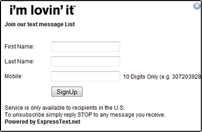
Display your text-2-join keyword on table tents, menu’s, posted signs and of course your web site if your restaurant has one. If the offer is enticing enough a potential customer will see it and happily join for the incentive of a discount or a free item of food clients anywhere they go.

Collect

Use other alternative means to collect some of your valuable customers information. Raffle off prizes with tickets where customers can fill out their information. Have a line printed on the bottom of the receipt check that allows for a mobile number. Add the web opt-in widget to the sign up page on your web site.

collect

broadcast

Broadcast

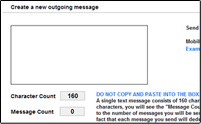
When you are having a slow day with sales, send out a mass message to your list of clients and sit back and watch them flow in. Give updates on promotion and sales you’re offering. Keep your regular clients updated with new products you may be adding to your menu.

Reach 270 Million Potential Customers 468×60

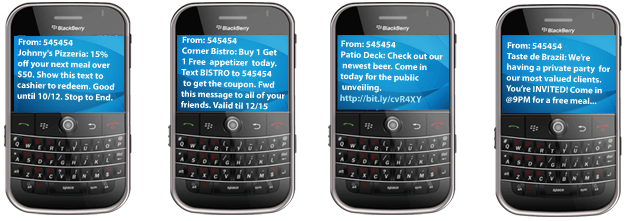
Examples

text examples

Reach customers instantly

Use text message marketing to reach your customers when you want to speak to them. Don’t rely on them to wait and think about your business, get their attention and make them think about your services. Send broadcasts out around lunch hour to catch the business rush or broadcast your happy hour specials to get them after they leave work.

Contact your entire staff in seconds!

Ever had a missed shift? Need to bring in some more people to deal with an unexpected crowd? Shoot a text message to all your employees in few seconds and get back to dealing with running your business.

Changing your hours of operation?

Notify all of your customers that you’ll be closing early or staying open later. They will appreciate the advance notice since they wouldn’t have found out until it was too late.

Celebrating a holiday?

Send your customers a happy holiday’s greeting. They will greatly appreciate it and remember the friendly atmosphere that you have in your restaurant. This will help with developing customer referrals and bringing in new business.


Reach 270 Million Potential Customers 468×60

30-DAY MONEY BACK GUARANTEE ON ALL ACCOUNTS

1,000’s of people have accounts with ExpressText. Get yours in just 60 seconds.

ExpressText is used by companies both BIG and small

clients

Reach 270 Million Potential Customers 468×60

Enhanced by Zemanta

Filed Under: Services Tagged With: bulk sms, Business, Customer, Marketing, mobile advertising, mobile advertising marketing, Mobile phone, Restaurant, sms marketing, Text message marketing, Text messaging, text-2-join, text-2-join keyword

World’s Greatest Online Business Intensive

By SoftwareGirl

The World’s Greatest Online Business Intensive is a 5-day seminar of intensive learning where you can literally walk in with no knowledge, no niche, no technical know how and literally walk out with a business in the palm of your hand!  It will be held in beautiful Colorado Springs November 7-11, 2011.

Participants will learn everything from how to turn on a computer to how to create and operate an online website, blog, membership site and affiliate program.  The seminar is being held at the Colorado Springs Mariott and lunches will be catered daily.  There will be a kick-off meet and greet Sunday evening prior to the seminar.

Joan Pounds, a 23 year veteran in the information technology industry will be leading the 5-day intensive.  The class size will be limited to 50 people to ensure a more intimate learning environment.  To learn more, you can visit http://monetizationmagic.com/wgobi/

Enhanced by Zemanta

Filed Under: Events Tagged With: Affiliate marketing, affiliate program, Business, Colorado Springs, membership site, online business, online business training, Seminar

Grow Your Leads by a Level of 10

By SoftwareGirl

With Anthony Robbins and Chet Holmes

Do you want to massively increase your flow of targeted leads, without increasing your marketing budget? Tony Robbins, recognized by Accenture, Harvard Business Review and American Express for his business accumen, and Chet Holmes, author of the best selling author of “The Ultimate Sales Machine”, show how to increase your lead flow by 10 times, with strategies and techniques that work for small business as well as multi-billion dollar corporations.

A BrightTALK Channel

Enhanced by Zemanta

Filed Under: Creating Traffic Tagged With: Accenture, American Express, Business, Harvard Business Review, Small business, The Ultimate Sales Machine: Turbocharge Your Business with Relentless Focus on 12 Key Strategies, Tony Robbins, Ultimate Sales Machine

New Training Coming This Fall

By SoftwareGirl

We will be releasing new training this fall. We want to know what you’re interested in learning.


Create your free online surveys with SurveyMonkey, the world’s leading questionnaire tool.

Filed Under: Uncategorized

How to Successfully Post a Link in a WordPress Blog

By SoftwareGirl


I came across this question out on Yahoo answers and thought I would take a moment to answer it here.  Link is a short version of the actual word hyperlink.  Links are often used in blogs to help the reader to jump to another area of interest either inside or outside of the blog itself.  A link can be attached to either text or images.

To Create a Text Link

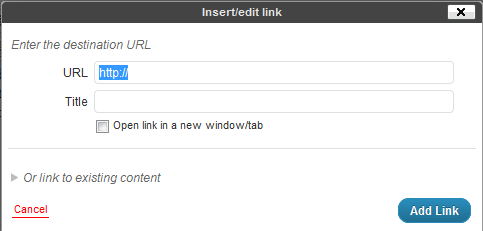
Creating a text link is quite easy.  If you can highlight text and type, you have the major skills necessary mastered already!  Choose the word or phrase you wish to convert to a link and highlight the word or phrase by clicking and holding down the left mouse button at the beginning of the text and dragging the mouse to the end of the text and releasing the mouse button.  The text is now highlighted.  Next click on the insert/edit link button in the toolbar above the post.

Then type the URL (address) to the destination for the link and click on the blue Add Link button.

To Create an Image Link

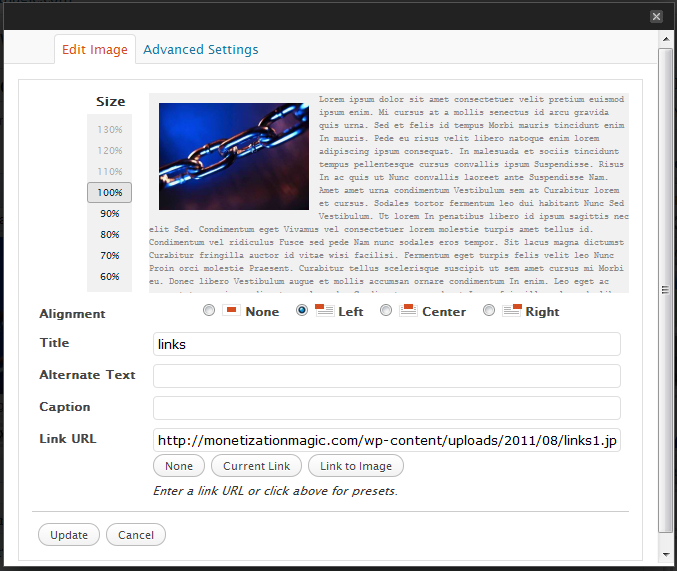
Creating an image link is similar to creating a text link.  Once you have the image embeded into your post, simply click on the image and you will see two buttons appear.  One looks like a mountain and is used to edit the image, we’ll be using this one.  Click on the button with the mountain on it and you should see a pop-up that looks like this:

In the “Link URL” field, delete the destination link of the current image and type the destination link and click on the Update button.  You can now update your post by clicking on the blue update button.

Testing your links is a good idea so that you can ensure that they will take your reader to the proper place.  Once, you’ve updated your post, simply open a separate browser window, go to the post with the link you want to test and click on the link and see where you’ve been taken by the link.  If you arrive at the correct place, you have place the link correctly.  If you do not arrive at the correct place, go back into your post, then look for errors in the destination URL.  Once the errors are found and corrected, click on the Update button again and retest.  Repeat until done.


Enhanced by Zemanta

Filed Under: Creating Content Tagged With: Clients, Hyperlink, Hypertext, Image, Uniform Resource Locator, Web page, WWW, Yahoo! Answers

7 Essential Pages to Market Products

By SoftwareGirl


Online entrepreneurs appear to take many roads to get to the same place which is an eventual sale.  If you’re an online entrepreneur who is just beginning, this can seem like an overwhelming task.  In actuality it can be very simple.  This simple process can be used to market all online products from eBooks to Mastermind programs.  The 7 pages that you will need are as follows:

Feeder Page

The feeder page is actually a network of pages consisting of your Facebook Fan Page, Twitter, blog feed, Zemanta network, weekly newsletter, and face time with other people where you tell others what you have to offer.

Opt-in Page

Your opt-in page is where people sign up to get more information about your interesting value packed content or products.  You’ve seen this page and probably opted in to receive someone’s information or products.  Typically what you will see on this page is a field for your name, a field for your email address and a submit button of some flavor.

Video Page

The video page is a page where you tell the people who opted in to receive the information all about the valuable information that you have to offer.  These videos can offer training or even just feature the benefits of what they will receive when they perform certain tasks or purchase a certain product.  Typically there are 3-4 videos that are released one at a time which built interest and enthusiasm for your product.  The primary purpose for the video page is to provide valuable content 3-4 times in succession.  This builds rapport and trust with your prospect.

Sales Page

The sales page is the page that you display to tell your prospective customer exactly what they will receive, how they will receive it and when they can expect to receive the item or information.

Check Out

The check out page is a secured check out area where the customer is able to enter their payment information.  A lot of times, the payment processor will automatically have this page created for you and all you need to do is to specify some parameters for the payment page.

Upsell/Downsell

This is the page that you direct a customer to who is not ready to purchase your original item.  For instance, if the customer is interested in your Platinum Mastermind program and decides that $19,997 is not in his or her budget this month, you might offer your $497 home study program so that they have a different option for receiving your valuable content rather than having to do without.

Thank You/Bonus Page

The thank you/bonus page thanks those who chose to purchase your product and to provide any bonuses and one more instructional video with the last bit of valuable content for those who did and did not purchase your products.  This goes a long way towards building a relationship with your prospects and your customers.

It is best to create these pages on an entirely separate domain from your main blog/website so that your main blog/website is not weighted down with all the content from this product.  It will also give you the best framework so that you can do a product launch without overwhelming your audience with too many options.  You can always use a link from your main site to tie is all together if you wish.  You will want to use a separate series of 7 pages for each and every product that you offer.  The URL for the product webpages would correspond to the catchy title of your product.  You can also offer a forum or membership area for each product without worrying that the extra content/traffic will bring your website to its knees or crash entirely under the load.

Enhanced by Zemanta

Filed Under: Back End Store Tagged With: Content (media), Customer, E-book, Facebook, framework for marketing products online, marketing products online, product creation, Twitter, Uniform Resource Locator, Web feed, Zemanta

  • « Previous Page
  • 1
  • …
  • 3
  • 4
  • 5
  • 6
  • 7
  • …
  • 10
  • Next Page »

Copyright © 2026 · Powered by Monetization Magic · Log in