Monetization Magic

Colorado Website Development

  • Home
    • Blog
  • Business Coaching
    • Action Strategy Session
    • Coaching Call Prep Form
    • Monetization Mastermind Table
    • Platinum Inner Circle
  • Services
    • Back Up and Website Maintenance
    • Hosting
  • Done For You
    • Small Business Quick Start
    • Website Development
      • Website Portfolio
      • Our Process
    • Advertising Maintenance
    • Video Web Commercials
      • Video Portfolio
  • About
  • Coaching Call Prep Form
  • Free Resources
  • Upcoming Classes
  • Media
  • Contact

3 Steps to Create Your Incredible Offer

By SoftwareGirl

SpecialOfferThe incredible offer is actually an ethical bribe given to the readers of your content in exchange for their name and email address.  An agreement is made that the reader would like what you have to offer and would like to keep in contact with you.  The reader wants to see if you’re able to deliver value and you would like the opportunity to demonstrate to the reader that you can provide value worthy of their time.  It gets its roots from the law of sowing and reaping.  You are giving away valuable content and are laying the foundation for reaping the benefit of a business relationship in the future.

You will need to know your prospective client prior to beginning.  Not just the demographics of who they are but also what they struggle with and what keeps them awake at 3 a.m.

Step 1:  List the reasons your prospective client hasn’t taken action up to this point.  This list will likely look like all the objections your prospective client has for not moving forward with achieving their goal.  When your prospective client reads this list, they will recognize their behavior or thought processes and begin to identify with your offer.

Step 2:  Create a bullet list of content that addresses each of the objections that you outlined in step one.  If you have a lot of content, that is great!  At this point, you may find that you have enough material for even a 6-week class.  You’ll be giving enough valuable content to get your reader started for now.  Then you can offer them the opportunity to work with you further if they wish.

Step 3: Create 3-5 tips that are the main free giveaway content by choosing one micro-problem that your prospective client faces every day and solve that problem or lead your prospect client through to the next logical step.  Make this meaty part extra special and oh so yummy to give your prospective client great value.  This isn’t fluff content, this is the filet mignon, the best part of s.

Once you’ve gotten this far, organize your materials, create your graphics and hook it into your autoresponder so that your content can be delivered on request.  That’s all there is to it!

Filed Under: Creating Content, Front End Offer, Sales Funnel

Website Design/Development versus Virtual Assistance

By SoftwareGirl

Let’s start with some definitions:

Web design encompasses many different skills and disciplines in the production and maintenance of websites. The different areas of web design include web graphic design; interface design; authoring, including standardized code and proprietary software; user experience design; and search engine optimization.

Web development is a broad term for the work involved in developing a web site for the Internet (World Wide Web) or an intranet (a private network). Web development can range from developing the simplest static single page of plain text to the most complex web-based internet applications, electronic businesses, and social network services. A more comprehensive list of tasks to which web development commonly refers, may include web design, web content development, client liaison, client-side/server-side scripting, web server and network security configuration, and e-commerce development. Among web professionals, “web development” usually refers to the main non-design aspects of building web sites: writing markup and coding.

A virtual assistant (typically abbreviated to VA, also called a virtual office assistant) is generally self-employed and provides professional administrative, technical, or creative (social) assistance to clients remotely from a home office.

What does all this mean?  In layman’s terms, basically the website developer builds the house, the website designer decorates the interior of the house and the virtual assistant creates the open house party.  Now if your foundation cracks, typically you would not call the person who created your open house party, you would call the person who built the house.

What I see happening in the market place is that in a rush to make some money, folks are advertising that they are some sort of web/virtual guru who have no business even attempting much less getting paid high dollars until they have some training, certification, degree, sizable portfolio or massive experience.  But they’ll only charge me $2.00 per hour!  That’s great!  How do you know they’ll finish the job?  On time?  With quality workmanship?  It seems the entrepreneur is now learning exactly what the Fortune 500 companies had to learn and that is that not everyone has a great work ethic, experience and commitment and it doesn’t matter how much you saved on the job if those ingredients are not included because what you’re really losing is the time that you could’ve been pursuing income generating opportunities.  You’ll never recover that time.

Technically what I see happening as a result of the blur between these terms is half built websites, websites that look like a 13-year old built them, hacked websites due to non-existent security, angry entrepreneurs who are dazzled by the buzz words but don’t really know what they want beyond they want a professional looking website that brings them money every month.

To help bring clarity to the intimidating task of hiring your technical team, here are 7 basic questions that you can start with to get you closer to what you really want:

1.  How long have you been doing web design, web development, virtual assistance?  2-3 years is a good starting point

2.  Do you offer a guarantee?  If they won’t even guarantee that they will honor their word and deliver what is promised, RUN AWAY!

3.  May I have a link to your online portfolio?  Even someone who is just starting out will have done some practice work and will have digital portfolio.

4.  May I see your testimonials?  If they haven’t started collecting testimonials, ask for references who can speak about their quality of work.

5.  Do you maintain the solutions that you build?  If they’re not willing to maintain the solutions they build, again RUN AWAY!

6.  Do you have any degrees or certifications?  Degrees and certifications tell you that this individual has spent some time, money and effort to advance their knowledge.  Yes, there are some who choose to teach themselves and that’s where the portfolio comes into play.

7.  Who are you currently being professionally coached by?  A true professional is always learning new techniques, expanding their pool of knowledge!

When you’re starting out as an entrepreneur, don’t be afraid to work with a true professional who has experience and produces quality work.  If that little voice in your head says, “But you can’t afford it!” acknowledge the little voice by saying “Thank you for sharing” and ask the professional how you can work together to make this more affordable for you.  You may need to sell some of your products and services before you can contract the professional or perhaps they have a payment plan that you can take advantage of that is not advertised up front.

Filed Under: Creating Content, Custom Websites, Performance, Technology, Training

10 Ways to Expand Your Brick and Mortar Business – Part 2 of 2

By SoftwareGirl

This post is a continuation of 10 Ways to Expand Your Brick and Mortar Business – Part 1

Meaningful content on the website.  Due to the Google search engine, it is imperative that meaningful content be placed regularly on your website.  That is why most static websites do not rank well with the search engines.  The search engines and your potential customers are interested in what is new and exciting.  If you just have a billboard website that states your name, address and phone number, and your competitor has a website that talks about weekly events, what’s new in the industry, new inventory, new employees and is constantly updating their website, they will naturally outrank you in the search engines.  Ranking is what the industry is all about because let’s face it, if you’re not on the first page or two of search results, most folks will never see your website.  The object is to engage your customer so they see you as a friend even before they pick up the phone or park in front of your business.  People buy from people they know, like and trust.  They want to see people and people in motion on your website rather than just having pretty pictures and text to read.

Google places.  Google places is a free ad for businesses so that their basic information can be found out on the internet.  Optimally, your place on Google places will also have a link to your highly interactive website along with your business hours and a map so that your business can be located.

Host events.  Your business needs to be a hub of activity and the way to make it a hub of activity is to host events.  Invite people into your business.  Host a Chamber of Commerce after hours event, ol’ Cal would often film the commercials at his lot so there was always a new animal to view.  You can also invite people in for free maintenance or checkups to ensure they will not need expensive service later.  For a car dealership, offer to have heater and air conditioning check ups, tire rotation, brake inspection, belt and hose inspection and other easy value added services.  The events you host are done to add value to the customer experience.  When you add enough value, your prospective customer will come to see you as a trusted resource. 

Incredible Offer.  You want to give prospective customers an incredible offer.  For the car lot, it could be a coupon book for discount services or free detailing on their current vehicle.  When you give the incredible offer it is always something they would definitely want and it is in exchange for their name and email.  You will continue to use their name and email to notify them of future events and other items of interest.

Complimentary Products.  Once your customers purchase an item or service from you, they usually will purchase complimentary products to make their initial purchase last longer or to decorate their initial purchase.  In the example of the used cars, complimentary products would include extended warranties, car insurance, supplemental car insurance (like AAA), car washes, car audio, specialty rims, car security, tinted windows, windshield replacement and repair, mobile oil change services, after market part suppliers and apparel.

Digital Products.  Digital products are great because you can make them once and sell them over and over again.  Digital products for a car dealership might include a video of what to check when buying a used car, it could be an affiliate link to a supplier that carries something that is commonly ordered that you choose not to stock, digital products could be tickets to a concert for a celebrity that happens to be coming to town next week that sponsors your vehicles, or sound file of what your cool mufflers actually sound like when installed on your car.  You’re probably laughing about that last one but that is an actual product…and my friend paid $29 for that sound file….still laughing?

Newsletter.  The newsletter is published at least twice a month telling your customers about upcoming new events and information having to do with your business.   You can also tell them funny stories or invite to future events.  For the car business, a newsletter could be used to notify customers of recalls and give them ways to quickly and easily take care of needed maintenance.  Let them know about your shuttle service.

Social Media.  Social media is where you create a community around your business.  You’re still being of service and it helps to create a buzz around your business.  For the car dealer, you might want to list videos of the latest sliding cars due to the ice storm last week, or pictures of the most modified cars.  You could have poll on the upcoming changes in the new car models.  You could have a poll on whether girls or guys like a particular model better than the other.  You would want to take pictures of your live events and post those up on social media for others to see.

If you like what you read in this article and would like to see how you can expand YOUR business, apply for a complimentary Action Strategy Session so that you can have a clear roadmap to take your busines to the next level!  The Action Strategy Session is valued at $297.00 and will give you concrete ways that you can move forward in your business.

Filed Under: Creating Content, Creating Traffic, Custom Websites, Events, Front End Offer, Performance, Sales Funnel, Services Tagged With: Facebook, Google, Keywords, Plan Better Events, Website, website design

10 Ways to Expand Your Brick and Mortar Business – Part 1 of 2

By SoftwareGirl

httpv://youtu.be/QOsLdT4slsk

When I was a little girl, my family moved to New Mexico from New Jersey.  In New Mexico, we only had 3 TV stations and they would only broadcast during certain hours of each day.  The information broadcast on that TV station was selective and even back in those days, what they broadcast was determined by what would get the TV station the highest ratings.  Everyday, I would see a commercial for a used car dealer who was in California and has some of the goofiest commercials I had ever seen.  His commercials often featured his “dog”, Spot.  His dog was often not a dog but would be an elephant or a tiger or some other wild animal.  Sometimes I wondered if people would watch him just to see the day when dear ol’ Cal actually got eaten by his “dog”, Spot!

I tell you this to make this point…Cal Worthington was all the way in California and I was a little girl all the way in the desert of New Mexico…but I knew who he was.  Cal Worthington sold a lot of cars when he ran those commercials.  Eventually Cal passed away.  Many years later, I had an opportunity to visit the great state of California.  When I got there, what did I remember about California?  You guessed it!  I remembered ol’ Cal Worthington and his wild dog, Spot.  I actually passed by the car lot and it was an event to me because I was able to remember all his commercials and the friends I was with at the time remembered him too.

Cal Worthington used TV to advertise his car lot and he attracted customers from the next town, the next county, the next state away.  There are a lot of people in the great state of California and he advertised so well that a little girl all the way in New Mexico (954 miles away) and 30 years later remembered his car lot.  Think about it, he was just another used car dealer and he found away to make his name known to a much broader audience.  Within 10 years of beginning in the business, his dealership was #1 in the nation!  He attracted so much attention that Johnny Carson even had him on the Tonight Show which had a national reach! 

You are blessed because business owners now do not have to purchase TV air time to get our message out!  We are able to rely on the technology that we have at our figure tips and our own ingenuity to promote our message. 

To illustrate how this works, I’ll be using ol’ Cal Worthington’s business to show you how we could expand his business using today’s technology:

Website.  Your website is the virtual hub of your business.  The website could be used to show people the new car models, book appointments with customers to come in a look at a car, apply for car financing so that they could have the convenience of knowing that they were already approved for a vehicle before they arrived and they could just come in a pick out their new vehicle.  They could schedule their normal service appointments, talk to a mechanic live via the website chat feature, order new accessory items for their new car or get a trade in value for their vehicle.

Keywords on the Website.  Using keywords helps the search engines to direct customers to your website.  Cal Worthington’s keywords might have been “Ford”, “dog Spot”, used cars, new cars, Long Beach, CA, and so on.  Today, Cal Worthington dealership still exists and the keywords they use are as follows: 

long beach ford, ford long beach, long beach ford parts, long beach ford service, used ford long beach, new ford long beach

If you like what you read in this article and would like to see how you can expand YOUR business, apply for a complimentary Action Strategy Session so that you can have a clear roadmap to take your busines to the next level!  The Action Strategy Session is valued at $297.00 and will give you concrete ways that you can move forward in your business.


Filed Under: Creating Content, Events, Performance, Sales Funnel, Services, Technology Tagged With: Business and Economy, Facebook, Google, Keywords, Plan Better Events, Website, website design

What IS an Income Producing Website?

By SoftwareGirl

photo-laptop-moneyQuite simply, an income producing website is a website that produces more money than what it takes to keep it running each month.  Every business person knows that it takes money to have a website and to keep it running.  There are domain names to be purchased and hosting companies to pay to allow your website to be housed on their systems.  Typically this amount is less than $20 each month.  Business owners don’t mind spending money on their business if they know that they are getting a return on their money.  If your website is not producing money for you, it might as well be an unlit billboard on a desolate desert highway in the middle of the night!  Fortunately, there IS something that you can do about it.

Begin by finding out who sees your website.  This will simply tell you about the traffic your website receives today.  Think of this as being point A.  This will tell you the good news and the bad news.  The good news is you’ll know where people are going on your website and how long they stay.  The bad news is you’ll know how small the traffic stream really is.  You can find out who sees your website by installing Google Analytics on your website and allowing it to gather statistics while you work on the other items in this article.

Think about your ideal customer.  If you can identify one customer in particular, an actual person with a pulse and a name, that is best.  What are this customer’s needs in relation to your business?  What do they buy?  If they were to look for something to satisfy their need or problem and they wanted to use Google to search for a solution to their need or problem, what would they type into the search field to find that solution?  What location do you want to service?  Where is your ideal customer located?  These are the items that make up your basic key words for your website:  customer problem, customer need, location, services offered, best selling items.  Your keywords need to be used on your website and in the content that you produce for your website.

Your customers are interested in your products and services and they want to know more about your business.  This gives you an opportunity to create meaningful content to place on your website.  Sell the sizzle of your product!

Your website has the ability to sell your products and services even when your business is closed.  Allow it to do just that by providing a way for your customers to book their own appointments, email you, buy products from you, interact with polls about upcoming products that you’re thinking about offering, finding out about upcoming events and purchasing tickets to those events.  Make it easy for the customer to interact with your site and they will continue to come back. 

Just having a website is a great first step.  Setting up the website to work for your is a wise business move because it begins to work for you and will free up your time and resources so that you can concentrate on your core business. 

Filed Under: Creating Content Tagged With: Business, Business and Economy, Google, Keywords, Marketing, Small business, website development

Your About Page Template

By SoftwareGirl

Your “About” Page gives your reader very basic information about you and your business.  This is also an area that gives you an opportunity to tell a bit of your back story here.  The basic information you want to include is a picture of you out in nature, if you have pets, it’s ok to feature them here as well.  That being said, if you happen to be the crazy cat lady, just choose your one favorite cat to show people that you enjoy animals.  Your audience will get the idea.
The next area is the Who I Am section where you give your name, why you’re qualified to do what you’re doing.  Basically you want to tell your audience, why they should listen do you.  Do you have degrees or certifications?  Go ahead and list those here.  If you don’t have degrees or certifications and you just happen to be passionate in this area, let your audience know how long you’ve been doing work in this area.

After the Who I Am section, the What I Do section will tell your reader what exactly it is that you can do for them.  You can tell them in a very general way how you will produce results for them when they choose to work with you.  For instance, you might say something such as “I do live in-person events, teleseminars, video courses, streaming live worldwide events as well as eCourses via e-mail”.  Make sure you incorporate exactly what it is that differentiates you from everyone else in this area.

At this point, you’ll want to get a little personal and tell folks why you’re doing this.  This area is call the Why I Do It area.  You can use the DIP method to present your case here if you’d like.  The DIP method goes like this:

  • What you’re doing today
  • “But it wasn’t always this way…”
  • How you changed your stars
  • Tell them about your road to recovery
  • Why you choose to work with your clients.  What is your paycheck of the heart?

The Why I Do It area is only one short paragraph so you’ll want to just use one sentence each for the bullet points above to  create your paragraph.

Finally, you’ll want to give your audience information on how they can contact you in the How to Connect with You area.  Be sure to include your links to social media here along with a reminder to sign up for your incredible free offer and your newsletter to receive regular updates. 

That’s it!  Your template is below.  Enjoy!

<Insert Picture Here>

Who I am

What I do

Why I Do It

How to Connect With Me


Filed Under: Creating Content Tagged With: blog making money, creating content, make money with blog, website development

Create Your Own Groupon – Part 2

By SoftwareGirl

Don’t cut your own throat.

Sometimes it’s ok to give an incredible deal as long as you know it will bring you more business not take money out of your pocket.  This is especially true if you are a small business. You can do many things as a small business to expand your business that doesn’t cause you to lose money as in the case of our example bakery.

Have everyone who responds register for an awesome give-away.

When running the special, offer an even bigger ridiculous special for one lucky person.  Have everyone who is getting the first special register for the 2nd one.  On the registration, collect name, email and phone number.  The name and email you can use to communicate with the customer later and the phone number is to notify the winner.

Use the media to your advantage!

While you’re having the special, take a moment out to have the media interview you on TV.  Create press releases for your business.  Do an exclusive interview on the radio.  Make sure you record both interviews to place on your website and then you can include an “As Seen On” badge for your website.

How to create your own?

Perhaps you’re a little leary of partnering with Groupon for your business expansion but you do still want to do something?  The good news is that you can.  Hold a one day sale.  You can do it online or in your business.  Create 1,000 flyers with your incredible offer.  Hire someone to place the flyers on doors within a certain radius of your business.  Then follow the rest of the tips outlined in this article.  This way you control your exposure and you can start small.

Use your small size to your advantage.

Small businesses are great because you can change direction on a dime!  You don’t need to wait for some board of directors to approve your decision once you have come up with a great idea.  You can execute it as soon as you want.  You could do a one day sale every month.  Consider partnering with a nearby school and offer them a portion of the profits of the sales from your one day sale.  If the first one works out well and you still want to expand your reach, do another sale and hand out more flyers or include another school.  You could also include another business for instance, if you’re a pizzeria and you’re having a sale, you could offer a free skate session from the roller rink down the street.  Get creative, make some money and have fun!

What are some of the sales or Groupons that you have done in the past that have worked well?  Let’s hear about it!  Leave your comment below.


Enhanced by Zemanta

Filed Under: Creating Content Tagged With: Business, Business and Economy, Groupon, sale, Small business

How to Successfully Post a Link in a WordPress Blog

By SoftwareGirl


I came across this question out on Yahoo answers and thought I would take a moment to answer it here.  Link is a short version of the actual word hyperlink.  Links are often used in blogs to help the reader to jump to another area of interest either inside or outside of the blog itself.  A link can be attached to either text or images.

To Create a Text Link

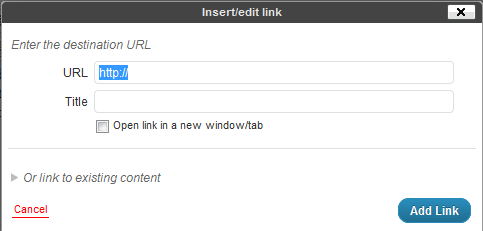
Creating a text link is quite easy.  If you can highlight text and type, you have the major skills necessary mastered already!  Choose the word or phrase you wish to convert to a link and highlight the word or phrase by clicking and holding down the left mouse button at the beginning of the text and dragging the mouse to the end of the text and releasing the mouse button.  The text is now highlighted.  Next click on the insert/edit link button in the toolbar above the post.

Then type the URL (address) to the destination for the link and click on the blue Add Link button.

To Create an Image Link

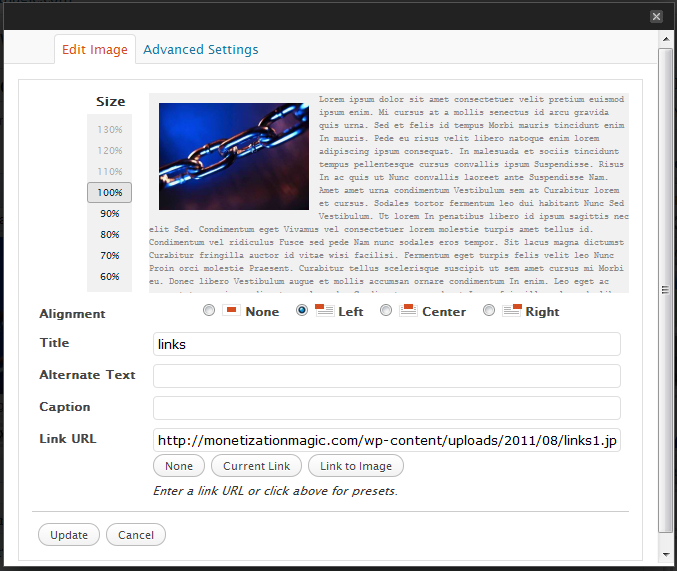
Creating an image link is similar to creating a text link.  Once you have the image embeded into your post, simply click on the image and you will see two buttons appear.  One looks like a mountain and is used to edit the image, we’ll be using this one.  Click on the button with the mountain on it and you should see a pop-up that looks like this:

In the “Link URL” field, delete the destination link of the current image and type the destination link and click on the Update button.  You can now update your post by clicking on the blue update button.

Testing your links is a good idea so that you can ensure that they will take your reader to the proper place.  Once, you’ve updated your post, simply open a separate browser window, go to the post with the link you want to test and click on the link and see where you’ve been taken by the link.  If you arrive at the correct place, you have place the link correctly.  If you do not arrive at the correct place, go back into your post, then look for errors in the destination URL.  Once the errors are found and corrected, click on the Update button again and retest.  Repeat until done.


Enhanced by Zemanta

Filed Under: Creating Content Tagged With: Clients, Hyperlink, Hypertext, Image, Uniform Resource Locator, Web page, WWW, Yahoo! Answers

  • 1
  • 2
  • 3
  • Next Page »

Copyright © 2026 · Powered by Monetization Magic · Log in