Monetization Magic

Colorado Website Development

  • Home
    • Blog
  • Business Coaching
    • Action Strategy Session
    • Coaching Call Prep Form
    • Monetization Mastermind Table
    • Platinum Inner Circle
  • Services
    • Back Up and Website Maintenance
    • Hosting
  • Done For You
    • Small Business Quick Start
    • Website Development
      • Website Portfolio
      • Our Process
    • Advertising Maintenance
    • Video Web Commercials
      • Video Portfolio
  • About
  • Coaching Call Prep Form
  • Free Resources
  • Upcoming Classes
  • Media
  • Contact

Website Design/Development versus Virtual Assistance

By SoftwareGirl

Let’s start with some definitions:

Web design encompasses many different skills and disciplines in the production and maintenance of websites. The different areas of web design include web graphic design; interface design; authoring, including standardized code and proprietary software; user experience design; and search engine optimization.

Web development is a broad term for the work involved in developing a web site for the Internet (World Wide Web) or an intranet (a private network). Web development can range from developing the simplest static single page of plain text to the most complex web-based internet applications, electronic businesses, and social network services. A more comprehensive list of tasks to which web development commonly refers, may include web design, web content development, client liaison, client-side/server-side scripting, web server and network security configuration, and e-commerce development. Among web professionals, “web development” usually refers to the main non-design aspects of building web sites: writing markup and coding.

A virtual assistant (typically abbreviated to VA, also called a virtual office assistant) is generally self-employed and provides professional administrative, technical, or creative (social) assistance to clients remotely from a home office.

What does all this mean?  In layman’s terms, basically the website developer builds the house, the website designer decorates the interior of the house and the virtual assistant creates the open house party.  Now if your foundation cracks, typically you would not call the person who created your open house party, you would call the person who built the house.

What I see happening in the market place is that in a rush to make some money, folks are advertising that they are some sort of web/virtual guru who have no business even attempting much less getting paid high dollars until they have some training, certification, degree, sizable portfolio or massive experience.  But they’ll only charge me $2.00 per hour!  That’s great!  How do you know they’ll finish the job?  On time?  With quality workmanship?  It seems the entrepreneur is now learning exactly what the Fortune 500 companies had to learn and that is that not everyone has a great work ethic, experience and commitment and it doesn’t matter how much you saved on the job if those ingredients are not included because what you’re really losing is the time that you could’ve been pursuing income generating opportunities.  You’ll never recover that time.

Technically what I see happening as a result of the blur between these terms is half built websites, websites that look like a 13-year old built them, hacked websites due to non-existent security, angry entrepreneurs who are dazzled by the buzz words but don’t really know what they want beyond they want a professional looking website that brings them money every month.

To help bring clarity to the intimidating task of hiring your technical team, here are 7 basic questions that you can start with to get you closer to what you really want:

1.  How long have you been doing web design, web development, virtual assistance?  2-3 years is a good starting point

2.  Do you offer a guarantee?  If they won’t even guarantee that they will honor their word and deliver what is promised, RUN AWAY!

3.  May I have a link to your online portfolio?  Even someone who is just starting out will have done some practice work and will have digital portfolio.

4.  May I see your testimonials?  If they haven’t started collecting testimonials, ask for references who can speak about their quality of work.

5.  Do you maintain the solutions that you build?  If they’re not willing to maintain the solutions they build, again RUN AWAY!

6.  Do you have any degrees or certifications?  Degrees and certifications tell you that this individual has spent some time, money and effort to advance their knowledge.  Yes, there are some who choose to teach themselves and that’s where the portfolio comes into play.

7.  Who are you currently being professionally coached by?  A true professional is always learning new techniques, expanding their pool of knowledge!

When you’re starting out as an entrepreneur, don’t be afraid to work with a true professional who has experience and produces quality work.  If that little voice in your head says, “But you can’t afford it!” acknowledge the little voice by saying “Thank you for sharing” and ask the professional how you can work together to make this more affordable for you.  You may need to sell some of your products and services before you can contract the professional or perhaps they have a payment plan that you can take advantage of that is not advertised up front.
Filed Under: Creating Content, Custom Websites, Performance, Technology, Training

10 Ways to Expand Your Brick and Mortar Business – Part 1 of 2

By SoftwareGirl

httpv://youtu.be/QOsLdT4slsk

When I was a little girl, my family moved to New Mexico from New Jersey.  In New Mexico, we only had 3 TV stations and they would only broadcast during certain hours of each day.  The information broadcast on that TV station was selective and even back in those days, what they broadcast was determined by what would get the TV station the highest ratings.  Everyday, I would see a commercial for a used car dealer who was in California and has some of the goofiest commercials I had ever seen.  His commercials often featured his “dog”, Spot.  His dog was often not a dog but would be an elephant or a tiger or some other wild animal.  Sometimes I wondered if people would watch him just to see the day when dear ol’ Cal actually got eaten by his “dog”, Spot!

I tell you this to make this point…Cal Worthington was all the way in California and I was a little girl all the way in the desert of New Mexico…but I knew who he was.  Cal Worthington sold a lot of cars when he ran those commercials.  Eventually Cal passed away.  Many years later, I had an opportunity to visit the great state of California.  When I got there, what did I remember about California?  You guessed it!  I remembered ol’ Cal Worthington and his wild dog, Spot.  I actually passed by the car lot and it was an event to me because I was able to remember all his commercials and the friends I was with at the time remembered him too.

Cal Worthington used TV to advertise his car lot and he attracted customers from the next town, the next county, the next state away.  There are a lot of people in the great state of California and he advertised so well that a little girl all the way in New Mexico (954 miles away) and 30 years later remembered his car lot.  Think about it, he was just another used car dealer and he found away to make his name known to a much broader audience.  Within 10 years of beginning in the business, his dealership was #1 in the nation!  He attracted so much attention that Johnny Carson even had him on the Tonight Show which had a national reach! 

You are blessed because business owners now do not have to purchase TV air time to get our message out!  We are able to rely on the technology that we have at our figure tips and our own ingenuity to promote our message. 

To illustrate how this works, I’ll be using ol’ Cal Worthington’s business to show you how we could expand his business using today’s technology:

Website.  Your website is the virtual hub of your business.  The website could be used to show people the new car models, book appointments with customers to come in a look at a car, apply for car financing so that they could have the convenience of knowing that they were already approved for a vehicle before they arrived and they could just come in a pick out their new vehicle.  They could schedule their normal service appointments, talk to a mechanic live via the website chat feature, order new accessory items for their new car or get a trade in value for their vehicle.

Keywords on the Website.  Using keywords helps the search engines to direct customers to your website.  Cal Worthington’s keywords might have been “Ford”, “dog Spot”, used cars, new cars, Long Beach, CA, and so on.  Today, Cal Worthington dealership still exists and the keywords they use are as follows: 

long beach ford, ford long beach, long beach ford parts, long beach ford service, used ford long beach, new ford long beach

If you like what you read in this article and would like to see how you can expand YOUR business, apply for a complimentary Action Strategy Session so that you can have a clear roadmap to take your busines to the next level!  The Action Strategy Session is valued at $297.00 and will give you concrete ways that you can move forward in your business.


Filed Under: Creating Content, Events, Performance, Sales Funnel, Services, Technology Tagged With: Business and Economy, Facebook, Google, Keywords, Plan Better Events, Website, website design

Steve Jobs changes the face of WordPress

By SoftwareGirl

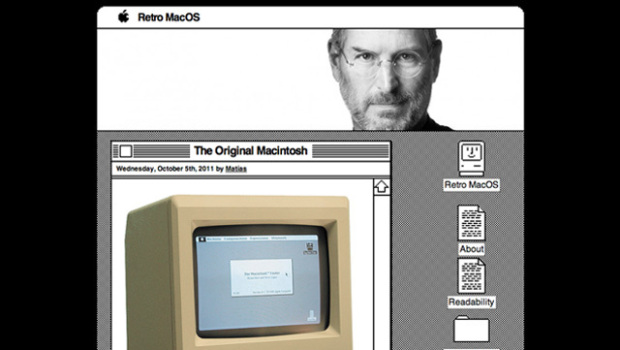
Matthew Mullenweg has revealed a new theme dedicated to Steve Jobs.  The WordPress team posted the Retro MacOS theme for fans of the old operating system. Mac OS icons will serve as links and post will live in windows. Aww.  Giving credit where credit is due, this actually originated with the website Boing Boing.  It looks like the original Macintosh interface in that it is black and white with clunky images.  It is configurable so if you still happen to need your company name in the header, it is possible to put that in for yourself.


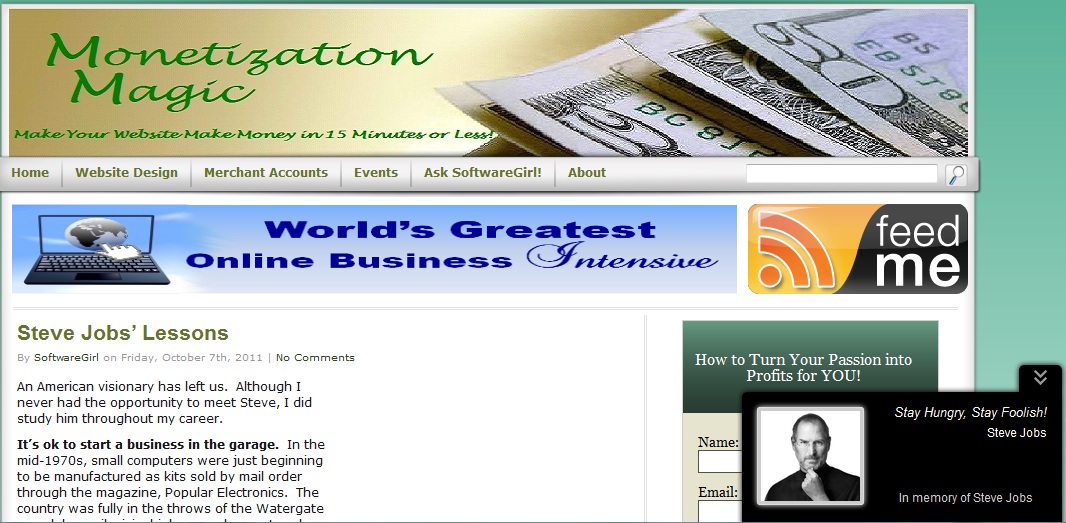
Steve Jobs is inspiring new plugins even after his passing.  The latest from Ivan Churkov is a pop up which reveals a picture of Steve Jobs with his famous quote “Stay Hungry, Stay Foolish”.


If you’d prefer an inspirational quote from Steve on your sidebar, there’s a widget for that too! This one is called appropriately Inspirational Steve Jobs Quotes.    There are two different styles for this one.  The styles vary the font from a script font to a somewhat straighter aerial font.


If you are so inclined to memorialize Steve on your blog, you can use some of these options to do so.  Steve Jobs’ was reportedly a very private individual and judging from what I’ve read about him, I think he’d be happier if we all just followed our passions and invented something great to serve the greater good of mankind.

http://wordpress.org/extend/plugins/inspirational-steve-jobs-quotes/screenshots/

Enhanced by Zemanta

Filed Under: Technology Tagged With: Apple, Boing Boing, Mac OS, Macintosh 128K, Matt Mullenweg, Steve Jobs, WordPress

Steve Jobs’ Lessons

By SoftwareGirl

An American visionary has left us.  Although I never had the opportunity to meet Steve, I did study him throughout my career.

It’s ok to start a business in the garage.  In the mid-1970s, small computers were just beginning to be manufactured as kits sold by mail order through the magazine, Popular Electronics.  The country was fully in the throws of the Watergate scandal, an oil crisis, high unemployment and inflation while exiting the Vietnam war.

It is observed that during times of high unemployment that Americans become very creative and spur the economy by what they create.  As a result, companies such as Hewlett-Packard grew out of World War II, Apple and Microsoft grew out of the 1970s.  They didn’t wait for their government to bail them out.

You can be successful even if you drop out of college.  He quit going to his regular classes 6 months after beginning college.  It took him another 18 months to finally officially drop out of college.  During that time he decided to drop into classes that interested him.  One of those classes was a calligraphy class which he thoroughly enjoyed and led to the original fonts that Apple used which set them apart from the personal computer.

Pursue your passion.  Steve enjoyed creating things beginning with the Apple I which grew from his garage.  The Apple I went on sale in July 1976.

The Apple I, Apple's first product, was sold as an assembled circuit board and lacked basic features such as a keyboard, monitor, and case. The owner of this unit added a keyboard and a wooden case.

A rolling stone gathers no moss.  Although the Apple I was somewhat of a success, they didn’t stop there.  The Apple II was introduced on April 16, 1977 and introduced an open architecture and color graphics.  Not all of Apple’s products were a success; however, those that weren’t often became the embryo for a later product that was a resounding success.  The lesson learned here is that even if you do something initially that is not a success, use that to create something even better.

Produce quality products.  While Apple Computers early products , based on a superior hardware platform, did not contain the “basic features” such as the keyboard, monitor and a case, what they did produce was a quality product.  During the early years of microcomputers, there was no such thing as a basic feature set.  Everything was sold as separate parts.

Pick your niche.  Apple Computer sold their systems primarily to the school systems with proprietary software which did not work on a regular personal computer.  Their price point was often double of what a personal computer would run.  They focused on the user experience.  They continually reinvented themselves largely due to Steve’s vision.

Use your setbacks as the launch pad for something really great.  Jobs delegated even his CEO duties to a business man so that he could spend time creating.  That same business man relieved Jobs of his job in the company that he founded.  The setback allowed him the time to reflect and discover that he really did have a passion for what he did.  Although he felt like a failure, he went on to create two other companies within the same year.  One company known as Next, Inc. may have very been the first time that someone facing adversity publicly simply said “Next” and moved forward.  The innovative object-oriented Nextstep operating system and development environment were highly influential.  NeXT also developed WebObjects, one of the first enterprise web application frameworks. WebObjects never became very popular because of its initial high price of $50,000 but remains a prominent early example of a web server based on dynamic page generation rather than static content. The other company was born from an even bigger idea as he bought George Lucas’ computer-graphics division in 1986.  This company was called Pixar, and the path to a pair of “Toy Story” friends was laid.   Although Steve Jobs created Pixar, he always considered it to be a hobby.

Apple acquired NeXT in 1996.  The main purpose of the acquisition was to use NeXTSTEP as a foundation to replace the dated Mac OS. 

Leverage.  Although Jobs did not receive any monetary rewards when Apple purchased NeXT, that didn’t stop him.  He returned Apple to profitability.  Using his experience with Apple, NeXT and Pixar, he went on to create wonderful consumer electronics such as the iPod, iPad, and iPhone.

Be the best…and let others know it.  What Steve knew was what his products were and what the competition offered.  He knew the pros and cons of both sides of the fence.  He used his knowledge of both to portray his products in a positive light.  He knew when something was not up to his standard and he would directly inform his employees of the lack when he saw it (usually by firing them on the spot).  He believed in himself and let others know about it.

While Steve Jobs was definitely a visionary and many are extolling great things about him due to his recent passing, he wasn’t always sunshine and roses to be around.  He was a multifaceted perfectionist who definitely marched to the beat of a different drummer.  He was known to reduce people to tears.  He could be both charming and brutal sometimes in the same sentence.  There is currently no one like Steve Jobs in his market and I strongly doubt we will ever see another like him.  He is a legend and has left us with an awesome legacy.


Enhanced by Zemanta

Filed Under: Technology Tagged With: Apple, Apple Computer, Hewlett-Packard, NeXT, Popular Electronics, Steve Jobs, United States, WebObjects

UPDATE: Are QR codes the Mark of the Beast or the best?

By SoftwareGirl

I recently heard someone speaking about QR codes being the Mark of the Beast.

What are QR codes? In a nutshell, QR codes are paper based hyperlinks.  Anyone in the blogging community knows that one of the keys to great search engine optimization is making sure you keep your website content updated, new and fresh.

Whether you do this with a blog, or you change your homepage with new offers, coupons or new products, it serves to show Google that your site is “alive.”  Having a blog is an easy way to keep the site “alive” with new content and comments from your readers.  That is one reason why Facebook has an Alexa score of 2 at the moment.

qrcode

QR code for Monetization Magic

Small businesses sometimes struggle with this if they have the typical billboard type website.  Once they upgrade their website to include a blog, that helps but what’s the next logical step?  Have you heard of QR codes yet? Here is a quick introduction: What are QR codes? They look like this:

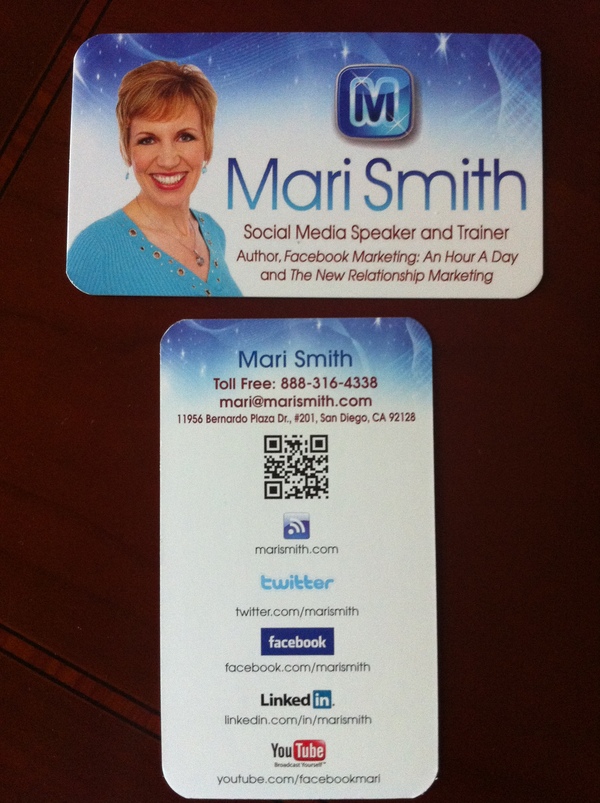
They come to us from Japan where they are very common. QR is short for Quick Response (they can be read quickly by a cell phone). They are used to take a piece of information from a transitory media and put it in to your cell phone. The airlines have been using them as early as 2008.  You may soon see QR Codes in a magazine advert, on a billboard, a web page or even on someone’s t-shirt.  Mari Smith gave me the idea of putting it on the back of her business card! That’s an excellent networking idea!

Once it is in your cell phone, it may give you details about that business (allowing users to search for nearby locations), or details about the person wearing the t-shirt, show you a URL which you can click to see a trailer for a movie, or it may give you a coupon which you can use in a local outlet. The reason why they are more useful than a standard barcode is that they can store (and digitally present) much more data, including url links, geo coordinates, and text. The other key feature of QR Codes is that instead of requiring a chunky hand-held scanner to scan them, many modern cell phones can scan them.  The full Wikipedia description is here.

How does the cell phone read the code? The cell phone needs a QR code reader. It takes literally 1 minute for someone with an iPhone or Android phone to find and install the reader.

How do you generate a code? You can easily generate a QR code using a site like Kaywa.com or you can use the Open Source code to generate codes for you if you have a smart developer on hand.

How can you use QR codes to benefit search marketing? Here are a few examples of how others are using them.  How will Google see them? If you add them to your website, the search engines will see that your pages have changed, and that you are updating pages. The search engine will see a new image and index it accordingly. At some point soon, the search engines will likely recognize QR codes and possibly index the content in them.

Will your customers use them? Today, a few may use them, but those that do will certainly appreciate your tech knowledge, and those that don’t will certainly be inquisitive, which may open the door for conversation and a potential sale. Those that do use QR codes will definitely have a high tech know-how and may be more receptive to your presence on the web, your Twitter presence, Facebook, MySpace, YouTube etc.

How could you use a QR code? Your business, no matter how small or large, could use QR codes in a number of ways. You could use them to direct your contacts to ever changing areas on your website.  Prospective employees could use them to point to their resume online! The QR code is generated and the link to which the code points can be changed.  I do see an issue there.  You will want to use a very secure password to generate your QR code so that you can retain control over where it points.

I think it’s neat to be able to use them when I’m visiting new places of interest.  I can see them being used to store video and audio of places of interest.  I think they’ll be awesome for the education system!  Perhaps this will help to usher in a mobile education system?

Need to know how to assemble something and you’re concerned about an issue with language translation?  No problem!  You’re instructions are now a video that is translated into your native language!  How awesome is that?!  Teachers could use these in their teaching plans to come up with all sorts of teaching tools to relate our history to our present day activities.

These codes are currently printed on paper.  Could they be tattooed? They could but will the QR reader be able to read them?  Have you ever seen someone who got a tattoo when they were in their 20’s that is now in their 50’s or 60’s?  The tattoo becomes distorted over the years.  The ink bleeds into the skin.  If the person has gained and lost a lot of weight, again, there is more distortion.  They are simply not practical for this application.  The mark can be removed or re-pointed to a null pointer rendering it useless.  So I don’t believe there is anything to be concerned about concerning QR codes in connection with the mark of the beast and end times predictions.  You can breathe now!

UPDATE: Apparently some folks are actually getting these QR codes permanently tattooed on their skin!  I knew it was just a matter of time; however, as I stated above, it’s only a matter of time before the tattoo will distort due to age.  The tattoo in the video below is large.  Never underestimate the power of marketing!

That being said, temporary tattoos might actually be a good thing for this band member.  Bands evolve rather quickly and so a permanent tattoo is not a good idea.  Even the Beatles split up after a while!  A temporary tattoo could be sold to the fans of a band and that would further promote the band to others who would actually be interested in hearing the music thereby creating more fans and eventual ticket sales.

Although this tattoo parlor looks to be fairly legitimate, I would have preferred to see this tattoo artist counsel his patron on a better way to get the word out about his band.  Indeed, the tattoo artist may have already done that, this is a short video and it just doesn’t show it.

Google has already moved on past QR codes in favor of NFC technology as of last December according to this article….rethinking that permanent tattoo yet?

Enhanced by Zemanta

Filed Under: Technology Tagged With: Facebook, Google, iPhone, Mobile phone, MySpace, Number of the Beast, permanent tattoo, QR Code, tattoo, temporary tattoo, Uniform Resource Locator, YouTube

Copyright © 2026 · Powered by Monetization Magic · Log in