Monetization Magic

Colorado Website Development

  • Home
    • Blog
  • Business Coaching
    • Action Strategy Session
    • Coaching Call Prep Form
    • Monetization Mastermind Table
    • Platinum Inner Circle
  • Services
    • Back Up and Website Maintenance
    • Hosting
  • Done For You
    • Small Business Quick Start
    • Website Development
      • Website Portfolio
      • Our Process
    • Advertising Maintenance
    • Video Web Commercials
      • Video Portfolio
  • About
  • Coaching Call Prep Form
  • Free Resources
  • Upcoming Classes
  • Media
  • Contact

FEATURED RESOURCE: Freelance Writer NZ

By SoftwareGirl

Today’s featured resource is Paul Callaghan of Freelance Writer NZ.  Paul Callaghan is a freelance writer, content strategist and SEO and social media consultant.

He has been publishing online since 1997 and in print since the early 1980s. Most of his work has been landing pages, articles and blogs and he also write email campaigns and advise on or manage social media and content strategies. He writes fiction for fun. In 2010, he decided it was time to give up his day job as Head of English at a New Zealand high school in order to set up Freelance Writer NZ  and write full time.

Read along as Paul describes what he does and why he does it:

Q.  What is your passion?

A.  I have always been passionate about words. What I love about the freelance lifestyle is the way it allows me to write for so many different people. I could be writing articles about cloud computing one day, and landing pages for jewelry or commentary on American politics the next. It makes for fascinating work.

Q.  What are the primary keys to a successful web business?

A.  SEO, search engine optimization, is one of the keys to a successful web business. In the years that I have been online I have seen SEO develop from a time when just about anyone could stuff a rough article with a few keywords and the search engines would pick it up. These days there is a lot more to it than that. While keywords are still important, search engine improvements like the Google Panda update mean that quality is what counts. It’s often said on the web that “content is king.” These days that should be “high quality content is king.”

Q.  Where does social media fit into marketing in today’s market?

A.  To improve your search engine rankings today you must also have a social media presence. It is likely that what happens off your page is as important, or sometimes even more important than what is on the page.

Many businesses start out with high hopes for their Facebook pages or Twitter accounts. After a few months, they feel they are not getting enough ROI from the time expended and either give up or barely post. That’s why it is important to have a clear strategy for your social media and any other content you publish online. And that includes on-going reviews of what works and what doesn’t.

There’s a lot of talk about the difficulties of online marketing. I like to keep things simple: regular high quality content backed up with an interactive social media campaign will lead to preselling your products or services. Once presold, the customer will head for your landing page where high quality copywriting makes the conversion from potential to actual customer.

It’s all about quality. Successful businesses know that.


Paul Callaghan is a freelance writer, blogger, copywriter, social media advisor and content strategist. Words are his passion. You can contact him through his website at www.freelancewriter.co.nz


Filed Under: Uncategorized

Seasonalize Your Website

By SoftwareGirl

As we approach the coming holiday season, it seems that everything is getting decorated. Have you thought that perhaps you’d like to decorate your WordPress website a bit as well? Now you can! I found a nice little plug in that will float objects down (for snowflakes and such) or up (for balloons and such) on your website pages. The plugin is called “Snow, balloons and more” and is a no cost solution for you!

What I like about this plugin is that it shows the images you want and they show up nicely then over the next 30 seconds or so and then fade away.  The images are there long enough for the “Oh cool” effect but not so long that your reader becomes irritated with the movement on the page.  There are several options of what you want to fall across your page.  You can choose snow, balloons, leaves, raindrops, etc.  The author of the plugin also encourages sending additional graphics to be included in the plugin.

This is a nice plugin that works well, doesn’t look too cheesy and gives the reader an uplifting experience while they visit your website.  Enjoy!

Filed Under: Custom Websites Tagged With: Wordpress snow plugin

Planning to Succeed in 2012

By SoftwareGirl

Do you have the processes in place to help you to succeed in 2012?  If you’re just starting, do you have your list in place?  If not, what are you actively doing to create your list?

The ability to use processes for the basic functionality of your business tells the tale of whether your business is a smooth running machine or if it’s an only half drafted

Rube Goldberg mechanism

Rube Goldberg mechanism that changes with each day.  The difference between the two is the ability for the system owner to focus on what is actually occurring repeatedly in the business in order for the business to create revenue.  The good news is that you already do this to some extent when you get up in the morning.

Most people get up, attend to personal hygiene, eat, drink and then move to the first item on their to-do list for the day.  At the end of the day, they come home, eat, recreate a bit, personal hygiene to prepare for bed and then bedtime.  The getting up process and retiring process that are used here personally could be compared to the process that you use to bring a customer on board and the process that you use to let a customer go.

Processes can be used in all areas of your business even when you’re just starting.  Processes are generally put in place in a rough form and refined over the course of time.  So the good news here is that you can start with just the idea that “Hey, I think this is a good idea for a process!”.  Once the process is in place, working well and refined to where you could almost do it in your sleep, then you’re ready to automate the process and take yourself out of it so that it runs by itself without you.  That’s the real beauty of having a process!  You don’t have to hire somebody, you don’t have to double check anything, you just have the confidence of knowing that until IT tells you it’s having an issue, you know it’s working!  This is where the machines truly begin to work for you and it’s a beautiful thing when this happens!
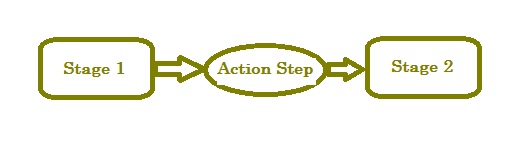
So you have the beginning and the end processes of what you need for your business.  The rest is just the processes in the middle.  Those will vary in specifics from business to business.  In an information marketing business, you might have processes such as newsletter creation and production, speaking engagements, order fulfillment, credit card processing, reversing credit card transactions (hopefully there are at a minimum), affiliate communications, and so on.  Once you have found all the processes at a high level that you need, you will label and define those processes.  Think of the processes as a point of arrival.  For instance, once a customer has arrived at the “on board” stage, what does that mean?  What activities have already occurred that have brought the customer to this point.  Those activities are your action steps.  You will have at least one action step between each stage.
Obviously, this is a very simplified version of what you are doing; however, I believe this will give you an idea of the basic structure.  Some of the common business processes are procurement, financing, marketing and sales, human resources,  manufacturing, transportation and customer service.  To assist you in getting started with thinking about what you want to present as offerings to you customer, I have created for you a Freedom Funnel, calendar and cash flow projection template to assist you in planning for 2012 in your business.


 Yes!  I am ready to receive the 2012 Planning Tools!

We respect your email privacy

Email Marketing by AWeber

 * You will also receive the Monetization Moment newsletter as a bonus.


Filed Under: Performance Tagged With: cash flow, planning, success

Create Your Own Groupon – Part 2

By SoftwareGirl

Don’t cut your own throat.

Sometimes it’s ok to give an incredible deal as long as you know it will bring you more business not take money out of your pocket.  This is especially true if you are a small business. You can do many things as a small business to expand your business that doesn’t cause you to lose money as in the case of our example bakery.

Have everyone who responds register for an awesome give-away.

When running the special, offer an even bigger ridiculous special for one lucky person.  Have everyone who is getting the first special register for the 2nd one.  On the registration, collect name, email and phone number.  The name and email you can use to communicate with the customer later and the phone number is to notify the winner.

Use the media to your advantage!

While you’re having the special, take a moment out to have the media interview you on TV.  Create press releases for your business.  Do an exclusive interview on the radio.  Make sure you record both interviews to place on your website and then you can include an “As Seen On” badge for your website.

How to create your own?

Perhaps you’re a little leary of partnering with Groupon for your business expansion but you do still want to do something?  The good news is that you can.  Hold a one day sale.  You can do it online or in your business.  Create 1,000 flyers with your incredible offer.  Hire someone to place the flyers on doors within a certain radius of your business.  Then follow the rest of the tips outlined in this article.  This way you control your exposure and you can start small.

Use your small size to your advantage.

Small businesses are great because you can change direction on a dime!  You don’t need to wait for some board of directors to approve your decision once you have come up with a great idea.  You can execute it as soon as you want.  You could do a one day sale every month.  Consider partnering with a nearby school and offer them a portion of the profits of the sales from your one day sale.  If the first one works out well and you still want to expand your reach, do another sale and hand out more flyers or include another school.  You could also include another business for instance, if you’re a pizzeria and you’re having a sale, you could offer a free skate session from the roller rink down the street.  Get creative, make some money and have fun!

What are some of the sales or Groupons that you have done in the past that have worked well?  Let’s hear about it!  Leave your comment below.


Enhanced by Zemanta

Filed Under: Creating Content Tagged With: Business, Business and Economy, Groupon, sale, Small business

Create Your Own Groupon – Part 1

By SoftwareGirl

Using Groupon can be very exciting for a business.  Sometimes it can be too exciting.  Take for example this bakery in the UK who says they lost $19,500.00 due to having to pay for supplemental labor during the Groupon special.  The bakery owner underestimated how popular the special would be and 8,500 people signed up for the offer.  What was the offer?  12 cupcakes for $10 which were normally priced at $40.  She lost between $2.90 and $4.70 on each dozen.

What can be learned from this?  The bakery owner’s goal was more business.  Obviously Groupon upheld their end of the deal there.  It sounds like in this case, too much of a good thing was…well, too much!

Limit Your Exposure

Groupon does allow you to limit your offer so if you know you’re not willing to bring in extra staff and train them for the rush that Groupon will create, limit the offer to the first X number of orders.  The trick is managing the mind tricks that will inevitably come when the rush is over and you tell yourself, “Gee, I bet we could’ve done 50 more orders”.

Know What Your Normal Staff Can Handle

The worst thing that could happen is that your staff is stressed during the offer and they walk out on you leaving you with an enormous amount of offers that you cannot fill.  Look at your current production.  Are you able to handle any more orders without bringing in help?  Ask your team for their input.  If they don’t think they can handle and extra 2500 orders or whatever your limiter is, then there’s your answer.

Bring in Extra Help and Train Them

Have a meeting with your team based on the questions you asked them about the temporary increase in production.  You did ask them, right?  Our example bakery was only used to making 100 cupcakes a month.  Let your team know that their jobs are secure and that you are bringing in extra help for the Groupon offer only and you’ll be letting the temporary help go after the offer expires.  Also let your team know that you’ll be treating them to something special after the offer expires as a thank you for their assistance during the busy time.

Give a coupon or book of coupons for repeat business.

With each Groupon offer that you fulfill, include a coupon or book of coupons for special offers that you will be having on your own over the course of the next year.  This will cost you very little and the payoff can be huge!  Get creative with the offers such as buy one get one, refer a friend and get half off, buy 2 get 3rd free and so on.  By extending the specials over the course of the year, there are many ways for that customer to return to you.  Most customers will only take you up on one or two coupons through the course of the year.

Check back for more ideas in the second part of this article which will appear in a few days.

Enhanced by Zemanta

Filed Under: Creating Traffic Tagged With: Business, Coupon, Groupon, LivingSocial

Add an HTML Signature to WebMail

By SoftwareGirl

Have you ever wanted to add a nice HTML signature to your webmail?  Most webmail clients do not allow the display of HTML without a VPS or dedicated server hosting account.  There is one webmail client which will allow this feature.  The webmail client that allows you to set up an HTML signature is called RoundCube.  Basically, inside the signature setup area there is a check box that when checked will allow for this functionality.  I have created this video to show you exactly what to do:

httpv://youtu.be/5sc6ObIR0zQ

The code that I refer to in the video is:

<p><strong>Your name goes here</strong><br /> Your position goes here<br /> Your Company Name<br /> Your Tag Line<br /> <a href=”mailto:yourname@yourdomainname.com”>yourname@yourdomainname.com</a><br /> Your phone number goes here</p>
<p><img src=”Your Logo Location” alt=”” /></p>

You will want to change all the highlighted areas to the appropriate settings for your environment prior to placing in the signature area.  If you need to host your image or logo outside of your normal hosting environment, you can set up a free account with Image Shack.  I’ve used them in the past and they are a great resource.

Filed Under: Training

Turning Billboard Websites into Profit Centers

By SoftwareGirl

Ten years ago all you needed to drive more business to your door step was just to create your webpage.  These webpages of yesteryear consisted of your business name, address, phone numbers and your hours of operation.  They were like billboards on the internet information highway.  Like billboards though, you didn’t know if your website was displayed unless you physically looked at it.  You weren’t sure who else saw it or if there was an interest in your products and services until someday in the future the customer happened to mention that they saw your billboard website during a transaction with you.  Was the billboard a good investment in terms of advertising dollars?  Exactly how much business could you attribute to someone seeing your website?  If your business actually was the “last chance” gas station, maybe you would know that the website actually drove traffic literally to your door, otherwise, you were likely clueless.  Do you have the proper tools on your website today to establish a relationship with someone who sees it?  Get ready to do your inventory!

Today business websites are buzzing hubs of activity and can drive and conduct business independently of any human interaction.  So what exactly do you need and why?

You will want to begin building a database of potential and current customers.  The database will reside in an autoresponder program and the people whose information is contained in the database will need to have opted in to your database so that you can communicate with them and remain in compliance with anti-spam federal laws.  There are many different autoresponder programs that you can use.

The people will enter in their own information into your database by way of your optin page which is connected to your autoresponder.  Once they have agreed to receive communication from you, you can send them newsletters and advance notification of any sales that you might be having in the near future.

Having an online store is another way that customers can interact with your business.  You have specialized knowledge and information that you customers are interested in and you can help them to solve problems with your specialized information.  You can hold special online classes and notify your customers of the special classes via your autoresponder.  If you direct them to a special page about the class, you can also have them register and pay for the class on the same page.  You can arrange for payment via your merchant account or via PayPal.

The beauty of all of this comes in the next arena which is the online store. I love this part because this is where the the machines begin to work for the humans!  Once you have created some products of your own or acquire the rights to sell other people’s products, you can create your own online store where your customers can shop anytime of the day or night.

To recap, you’ll need the following items to upgrade your website:

  • Autoresponder (contains your database)
  • Merchant account
  • Online store

If you need assistance with any of these, an Action Strategy Session would definitely benefit you!  Secure your spot at http://tungle.me/joanpounds so that we can have a conversation to take your website to the next level!

Enhanced by Zemanta

Filed Under: Creating Traffic Tagged With: autoresponder, Business, Customer, Merchant account, Online shopping, Website

Steve Jobs changes the face of WordPress

By SoftwareGirl

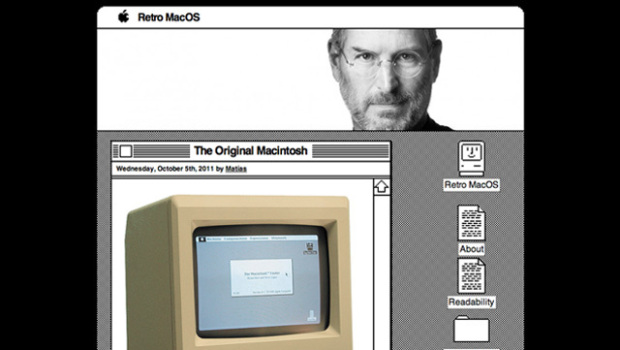
Matthew Mullenweg has revealed a new theme dedicated to Steve Jobs.  The WordPress team posted the Retro MacOS theme for fans of the old operating system. Mac OS icons will serve as links and post will live in windows. Aww.  Giving credit where credit is due, this actually originated with the website Boing Boing.  It looks like the original Macintosh interface in that it is black and white with clunky images.  It is configurable so if you still happen to need your company name in the header, it is possible to put that in for yourself.


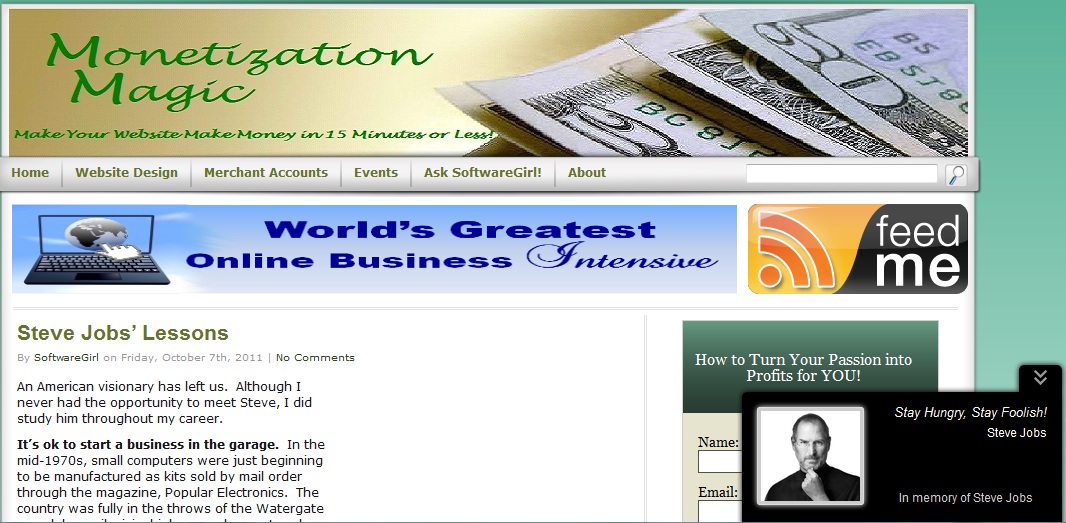
Steve Jobs is inspiring new plugins even after his passing.  The latest from Ivan Churkov is a pop up which reveals a picture of Steve Jobs with his famous quote “Stay Hungry, Stay Foolish”.


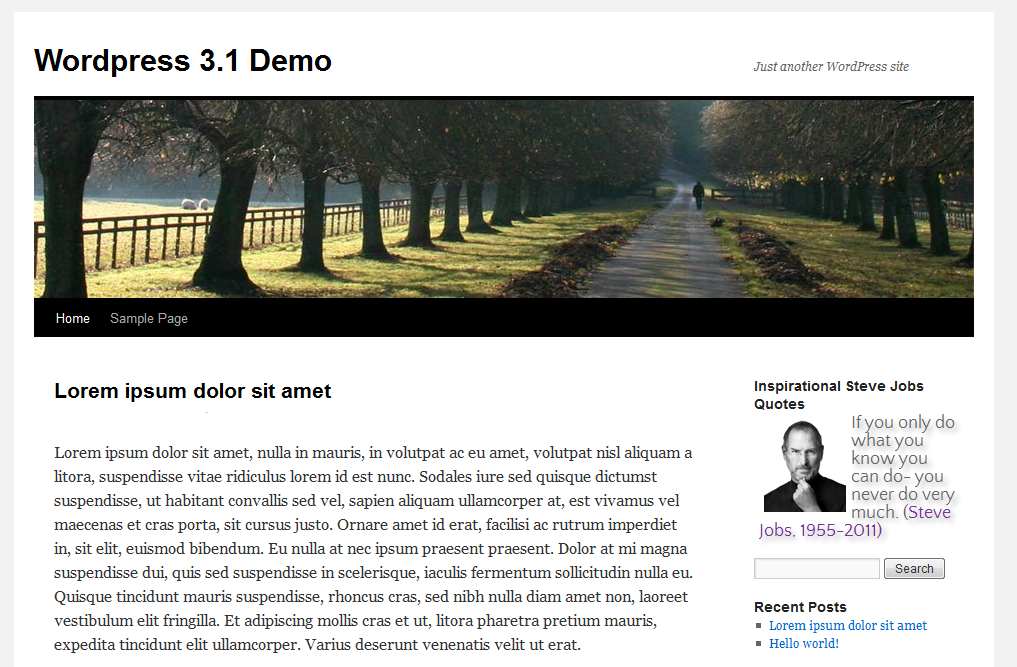
If you’d prefer an inspirational quote from Steve on your sidebar, there’s a widget for that too! This one is called appropriately Inspirational Steve Jobs Quotes.    There are two different styles for this one.  The styles vary the font from a script font to a somewhat straighter aerial font.


If you are so inclined to memorialize Steve on your blog, you can use some of these options to do so.  Steve Jobs’ was reportedly a very private individual and judging from what I’ve read about him, I think he’d be happier if we all just followed our passions and invented something great to serve the greater good of mankind.

http://wordpress.org/extend/plugins/inspirational-steve-jobs-quotes/screenshots/

Enhanced by Zemanta

Filed Under: Technology Tagged With: Apple, Boing Boing, Mac OS, Macintosh 128K, Matt Mullenweg, Steve Jobs, WordPress

  • « Previous Page
  • 1
  • 2
  • 3
  • 4
  • 5
  • 6
  • …
  • 10
  • Next Page »

Copyright © 2026 · Powered by Monetization Magic · Log in