Monetization Magic

Colorado Website Development

  • Home
    • Blog
  • Business Coaching
    • Action Strategy Session
    • Coaching Call Prep Form
    • Monetization Mastermind Table
    • Platinum Inner Circle
  • Services
    • Back Up and Website Maintenance
    • Hosting
  • Done For You
    • Small Business Quick Start
    • Website Development
      • Website Portfolio
      • Our Process
    • Advertising Maintenance
    • Video Web Commercials
      • Video Portfolio
  • About
  • Coaching Call Prep Form
  • Free Resources
  • Upcoming Classes
  • Media
  • Contact

How to Successfully Post a Link in a WordPress Blog

By SoftwareGirl


I came across this question out on Yahoo answers and thought I would take a moment to answer it here.  Link is a short version of the actual word hyperlink.  Links are often used in blogs to help the reader to jump to another area of interest either inside or outside of the blog itself.  A link can be attached to either text or images.

To Create a Text Link

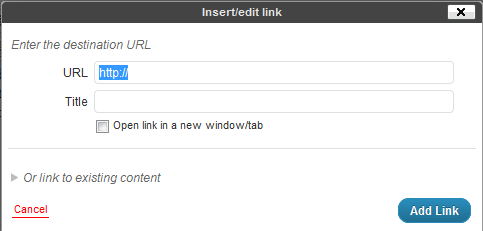
Creating a text link is quite easy.  If you can highlight text and type, you have the major skills necessary mastered already!  Choose the word or phrase you wish to convert to a link and highlight the word or phrase by clicking and holding down the left mouse button at the beginning of the text and dragging the mouse to the end of the text and releasing the mouse button.  The text is now highlighted.  Next click on the insert/edit link button in the toolbar above the post.

Then type the URL (address) to the destination for the link and click on the blue Add Link button.
To Create an Image Link

Creating an image link is similar to creating a text link.  Once you have the image embeded into your post, simply click on the image and you will see two buttons appear.  One looks like a mountain and is used to edit the image, we’ll be using this one.  Click on the button with the mountain on it and you should see a pop-up that looks like this:
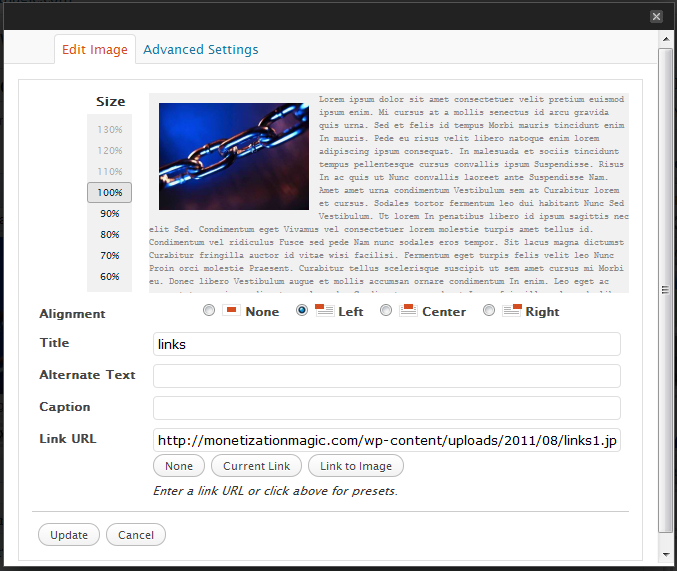
In the “Link URL” field, delete the destination link of the current image and type the destination link and click on the Update button.  You can now update your post by clicking on the blue update button.

Testing your links is a good idea so that you can ensure that they will take your reader to the proper place.  Once, you’ve updated your post, simply open a separate browser window, go to the post with the link you want to test and click on the link and see where you’ve been taken by the link.  If you arrive at the correct place, you have place the link correctly.  If you do not arrive at the correct place, go back into your post, then look for errors in the destination URL.  Once the errors are found and corrected, click on the Update button again and retest.  Repeat until done.


Enhanced by Zemanta

Filed Under: Creating Content Tagged With: Clients, Hyperlink, Hypertext, Image, Uniform Resource Locator, Web page, WWW, Yahoo! Answers

7 Essential Pages to Market Products

By SoftwareGirl


Online entrepreneurs appear to take many roads to get to the same place which is an eventual sale.  If you’re an online entrepreneur who is just beginning, this can seem like an overwhelming task.  In actuality it can be very simple.  This simple process can be used to market all online products from eBooks to Mastermind programs.  The 7 pages that you will need are as follows:

Feeder Page

The feeder page is actually a network of pages consisting of your Facebook Fan Page, Twitter, blog feed, Zemanta network, weekly newsletter, and face time with other people where you tell others what you have to offer.

Opt-in Page

Your opt-in page is where people sign up to get more information about your interesting value packed content or products.  You’ve seen this page and probably opted in to receive someone’s information or products.  Typically what you will see on this page is a field for your name, a field for your email address and a submit button of some flavor.

Video Page

The video page is a page where you tell the people who opted in to receive the information all about the valuable information that you have to offer.  These videos can offer training or even just feature the benefits of what they will receive when they perform certain tasks or purchase a certain product.  Typically there are 3-4 videos that are released one at a time which built interest and enthusiasm for your product.  The primary purpose for the video page is to provide valuable content 3-4 times in succession.  This builds rapport and trust with your prospect.

Sales Page

The sales page is the page that you display to tell your prospective customer exactly what they will receive, how they will receive it and when they can expect to receive the item or information.

Check Out

The check out page is a secured check out area where the customer is able to enter their payment information.  A lot of times, the payment processor will automatically have this page created for you and all you need to do is to specify some parameters for the payment page.

Upsell/Downsell

This is the page that you direct a customer to who is not ready to purchase your original item.  For instance, if the customer is interested in your Platinum Mastermind program and decides that $19,997 is not in his or her budget this month, you might offer your $497 home study program so that they have a different option for receiving your valuable content rather than having to do without.

Thank You/Bonus Page

The thank you/bonus page thanks those who chose to purchase your product and to provide any bonuses and one more instructional video with the last bit of valuable content for those who did and did not purchase your products.  This goes a long way towards building a relationship with your prospects and your customers.

It is best to create these pages on an entirely separate domain from your main blog/website so that your main blog/website is not weighted down with all the content from this product.  It will also give you the best framework so that you can do a product launch without overwhelming your audience with too many options.  You can always use a link from your main site to tie is all together if you wish.  You will want to use a separate series of 7 pages for each and every product that you offer.  The URL for the product webpages would correspond to the catchy title of your product.  You can also offer a forum or membership area for each product without worrying that the extra content/traffic will bring your website to its knees or crash entirely under the load.

Enhanced by Zemanta

Filed Under: Back End Store Tagged With: Content (media), Customer, E-book, Facebook, framework for marketing products online, marketing products online, product creation, Twitter, Uniform Resource Locator, Web feed, Zemanta

UPDATE: Are QR codes the Mark of the Beast or the best?

By SoftwareGirl

I recently heard someone speaking about QR codes being the Mark of the Beast.

What are QR codes? In a nutshell, QR codes are paper based hyperlinks.  Anyone in the blogging community knows that one of the keys to great search engine optimization is making sure you keep your website content updated, new and fresh.

Whether you do this with a blog, or you change your homepage with new offers, coupons or new products, it serves to show Google that your site is “alive.”  Having a blog is an easy way to keep the site “alive” with new content and comments from your readers.  That is one reason why Facebook has an Alexa score of 2 at the moment.

qrcode

QR code for Monetization Magic

Small businesses sometimes struggle with this if they have the typical billboard type website.  Once they upgrade their website to include a blog, that helps but what’s the next logical step?  Have you heard of QR codes yet? Here is a quick introduction: What are QR codes? They look like this:

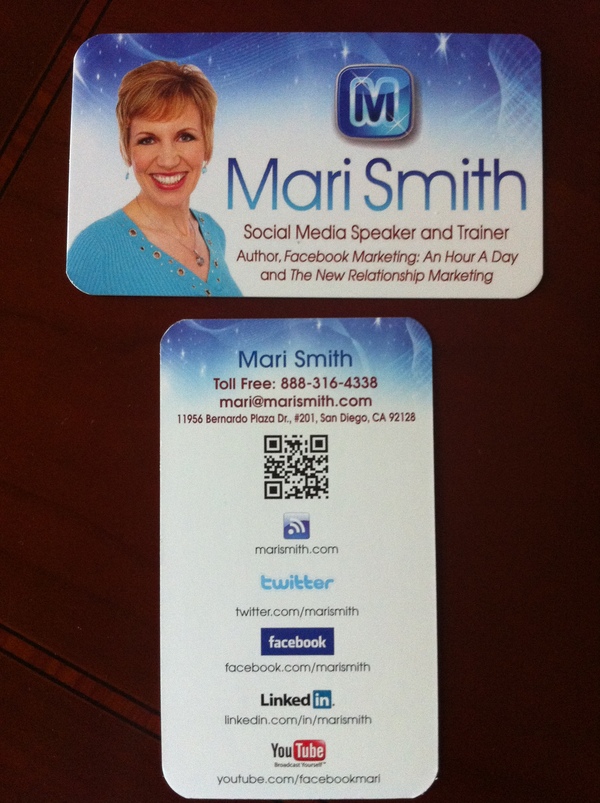
They come to us from Japan where they are very common. QR is short for Quick Response (they can be read quickly by a cell phone). They are used to take a piece of information from a transitory media and put it in to your cell phone. The airlines have been using them as early as 2008.  You may soon see QR Codes in a magazine advert, on a billboard, a web page or even on someone’s t-shirt.  Mari Smith gave me the idea of putting it on the back of her business card! That’s an excellent networking idea!

Once it is in your cell phone, it may give you details about that business (allowing users to search for nearby locations), or details about the person wearing the t-shirt, show you a URL which you can click to see a trailer for a movie, or it may give you a coupon which you can use in a local outlet. The reason why they are more useful than a standard barcode is that they can store (and digitally present) much more data, including url links, geo coordinates, and text. The other key feature of QR Codes is that instead of requiring a chunky hand-held scanner to scan them, many modern cell phones can scan them.  The full Wikipedia description is here.

How does the cell phone read the code? The cell phone needs a QR code reader. It takes literally 1 minute for someone with an iPhone or Android phone to find and install the reader.

How do you generate a code? You can easily generate a QR code using a site like Kaywa.com or you can use the Open Source code to generate codes for you if you have a smart developer on hand.

How can you use QR codes to benefit search marketing? Here are a few examples of how others are using them.  How will Google see them? If you add them to your website, the search engines will see that your pages have changed, and that you are updating pages. The search engine will see a new image and index it accordingly. At some point soon, the search engines will likely recognize QR codes and possibly index the content in them.

Will your customers use them? Today, a few may use them, but those that do will certainly appreciate your tech knowledge, and those that don’t will certainly be inquisitive, which may open the door for conversation and a potential sale. Those that do use QR codes will definitely have a high tech know-how and may be more receptive to your presence on the web, your Twitter presence, Facebook, MySpace, YouTube etc.

How could you use a QR code? Your business, no matter how small or large, could use QR codes in a number of ways. You could use them to direct your contacts to ever changing areas on your website.  Prospective employees could use them to point to their resume online! The QR code is generated and the link to which the code points can be changed.  I do see an issue there.  You will want to use a very secure password to generate your QR code so that you can retain control over where it points.

I think it’s neat to be able to use them when I’m visiting new places of interest.  I can see them being used to store video and audio of places of interest.  I think they’ll be awesome for the education system!  Perhaps this will help to usher in a mobile education system?

Need to know how to assemble something and you’re concerned about an issue with language translation?  No problem!  You’re instructions are now a video that is translated into your native language!  How awesome is that?!  Teachers could use these in their teaching plans to come up with all sorts of teaching tools to relate our history to our present day activities.

These codes are currently printed on paper.  Could they be tattooed? They could but will the QR reader be able to read them?  Have you ever seen someone who got a tattoo when they were in their 20’s that is now in their 50’s or 60’s?  The tattoo becomes distorted over the years.  The ink bleeds into the skin.  If the person has gained and lost a lot of weight, again, there is more distortion.  They are simply not practical for this application.  The mark can be removed or re-pointed to a null pointer rendering it useless.  So I don’t believe there is anything to be concerned about concerning QR codes in connection with the mark of the beast and end times predictions.  You can breathe now!

UPDATE: Apparently some folks are actually getting these QR codes permanently tattooed on their skin!  I knew it was just a matter of time; however, as I stated above, it’s only a matter of time before the tattoo will distort due to age.  The tattoo in the video below is large.  Never underestimate the power of marketing!

That being said, temporary tattoos might actually be a good thing for this band member.  Bands evolve rather quickly and so a permanent tattoo is not a good idea.  Even the Beatles split up after a while!  A temporary tattoo could be sold to the fans of a band and that would further promote the band to others who would actually be interested in hearing the music thereby creating more fans and eventual ticket sales.

Although this tattoo parlor looks to be fairly legitimate, I would have preferred to see this tattoo artist counsel his patron on a better way to get the word out about his band.  Indeed, the tattoo artist may have already done that, this is a short video and it just doesn’t show it.

Google has already moved on past QR codes in favor of NFC technology as of last December according to this article….rethinking that permanent tattoo yet?

Enhanced by Zemanta

Filed Under: Technology Tagged With: Facebook, Google, iPhone, Mobile phone, MySpace, Number of the Beast, permanent tattoo, QR Code, tattoo, temporary tattoo, Uniform Resource Locator, YouTube

10 Ways to Build Quality Links to Your Website

By SoftwareGirl

  1. Write guest posts on blogs that are related to your field. Many bloggers will be glad to allow you to provide some fresh content for them in exchange for a link back to your site. Just contact the blogger and make an offer.
  2. Answer questions on sites such as Answers.Yahoo.com, AllExperts.com and JustAnswer.com. By providing quality advice on subjects related to your site, you link to your pages as related information. Just understand that sites like this frown on website owners simply linking to their sites. You can link when it’s relevant, but you don’t need to say it’s your own site.
  3. Offer testimonials for the sales pages of products you enjoy. Internet marketers love to get them, and most will gladly post an active link or at least a URL to your site in return.
  4. Find other organizations that link to members’ websites to join. For best results, choose ones related to your niche.
  5. Offer to write articles for a fellow blogger or news media organization. You’ll want to voluntarily send them a sample of your work ahead of time so that they get a taste of what you’re offering.
  6. Join and participate in forums. Add links to your site to your signature.
  7. Comment on blogs whose subject matter is related to your site. If you take the time to read the post and write a good, relevant comment, the blogger is unlikely to consider this spamming. Be respectful; keep your link in the space provided for your link.
  8. Sponsor giveaways on blogs. You supply the product, and the blogger holds the giveaway.  You’ll get a link from the blogger, and you could also request that entrants be required to link to your site.  Make sure that the blog is in a related field and readers are interested in what you’re giving away!
  9. Create profiles on popular social networking sites, and link to your site from them. Some of these will be “no follow” links, but when link building, don’t worry about this…just build good, quality links.
  10. Make yourself available for interviews, not only online, but with offline media. Most media outlets have websites, and they often post transcripts of interviews there along with relevant links.

Do you have other ways that you have used that work well for building quality links?  Please do share what you’ve done and how well it worked in the comment section below!  Hint:  This is a great example of a invitation for #7 above!

Filed Under: Creating Traffic Tagged With: blog, Social network service, Uniform Resource Locator, Web Design and Development, Website, Yahoo! Answers

Copyright © 2026 · Powered by Monetization Magic · Log in