Monetization Magic

Colorado Website Development

  • Home
    • Blog
  • Business Coaching
    • Action Strategy Session
    • Coaching Call Prep Form
    • Monetization Mastermind Table
    • Platinum Inner Circle
  • Services
    • Back Up and Website Maintenance
    • Hosting
  • Done For You
    • Small Business Quick Start
    • Website Development
      • Website Portfolio
      • Our Process
    • Advertising Maintenance
    • Video Web Commercials
      • Video Portfolio
  • About
  • Coaching Call Prep Form
  • Free Resources
  • Upcoming Classes
  • Media
  • Contact

How to Successfully Post a Link in a WordPress Blog

By SoftwareGirl


I came across this question out on Yahoo answers and thought I would take a moment to answer it here.  Link is a short version of the actual word hyperlink.  Links are often used in blogs to help the reader to jump to another area of interest either inside or outside of the blog itself.  A link can be attached to either text or images.

To Create a Text Link

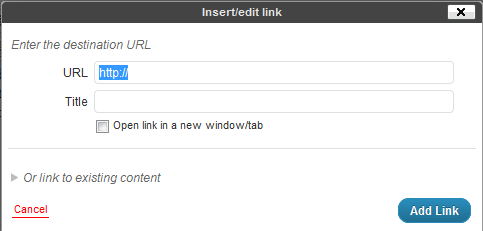
Creating a text link is quite easy.  If you can highlight text and type, you have the major skills necessary mastered already!  Choose the word or phrase you wish to convert to a link and highlight the word or phrase by clicking and holding down the left mouse button at the beginning of the text and dragging the mouse to the end of the text and releasing the mouse button.  The text is now highlighted.  Next click on the insert/edit link button in the toolbar above the post.

Then type the URL (address) to the destination for the link and click on the blue Add Link button.
To Create an Image Link

Creating an image link is similar to creating a text link.  Once you have the image embeded into your post, simply click on the image and you will see two buttons appear.  One looks like a mountain and is used to edit the image, we’ll be using this one.  Click on the button with the mountain on it and you should see a pop-up that looks like this:
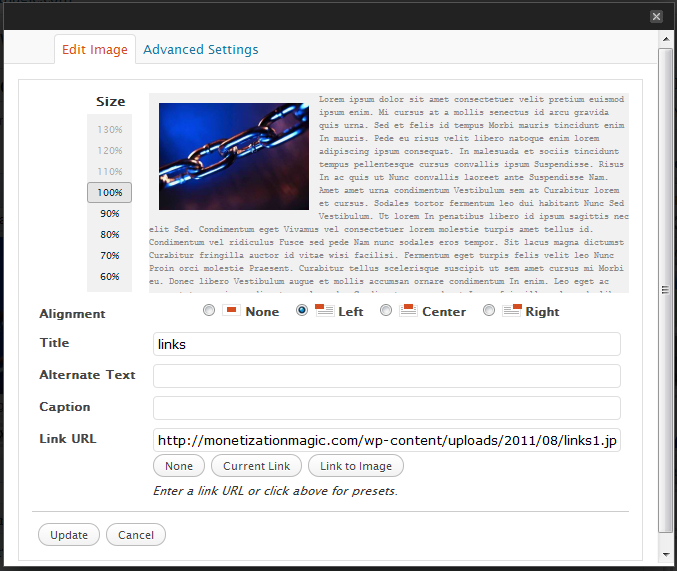
In the “Link URL” field, delete the destination link of the current image and type the destination link and click on the Update button.  You can now update your post by clicking on the blue update button.

Testing your links is a good idea so that you can ensure that they will take your reader to the proper place.  Once, you’ve updated your post, simply open a separate browser window, go to the post with the link you want to test and click on the link and see where you’ve been taken by the link.  If you arrive at the correct place, you have place the link correctly.  If you do not arrive at the correct place, go back into your post, then look for errors in the destination URL.  Once the errors are found and corrected, click on the Update button again and retest.  Repeat until done.


Enhanced by Zemanta

Filed Under: Creating Content Tagged With: Clients, Hyperlink, Hypertext, Image, Uniform Resource Locator, Web page, WWW, Yahoo! Answers

10 Ways to Build Quality Links to Your Website

By SoftwareGirl

  1. Write guest posts on blogs that are related to your field. Many bloggers will be glad to allow you to provide some fresh content for them in exchange for a link back to your site. Just contact the blogger and make an offer.
  2. Answer questions on sites such as Answers.Yahoo.com, AllExperts.com and JustAnswer.com. By providing quality advice on subjects related to your site, you link to your pages as related information. Just understand that sites like this frown on website owners simply linking to their sites. You can link when it’s relevant, but you don’t need to say it’s your own site.
  3. Offer testimonials for the sales pages of products you enjoy. Internet marketers love to get them, and most will gladly post an active link or at least a URL to your site in return.
  4. Find other organizations that link to members’ websites to join. For best results, choose ones related to your niche.
  5. Offer to write articles for a fellow blogger or news media organization. You’ll want to voluntarily send them a sample of your work ahead of time so that they get a taste of what you’re offering.
  6. Join and participate in forums. Add links to your site to your signature.
  7. Comment on blogs whose subject matter is related to your site. If you take the time to read the post and write a good, relevant comment, the blogger is unlikely to consider this spamming. Be respectful; keep your link in the space provided for your link.
  8. Sponsor giveaways on blogs. You supply the product, and the blogger holds the giveaway.  You’ll get a link from the blogger, and you could also request that entrants be required to link to your site.  Make sure that the blog is in a related field and readers are interested in what you’re giving away!
  9. Create profiles on popular social networking sites, and link to your site from them. Some of these will be “no follow” links, but when link building, don’t worry about this…just build good, quality links.
  10. Make yourself available for interviews, not only online, but with offline media. Most media outlets have websites, and they often post transcripts of interviews there along with relevant links.

Do you have other ways that you have used that work well for building quality links?  Please do share what you’ve done and how well it worked in the comment section below!  Hint:  This is a great example of a invitation for #7 above!

Filed Under: Creating Traffic Tagged With: blog, Social network service, Uniform Resource Locator, Web Design and Development, Website, Yahoo! Answers

Copyright © 2026 · Powered by Monetization Magic · Log in